This article is a part of my full LaTeX guide here article
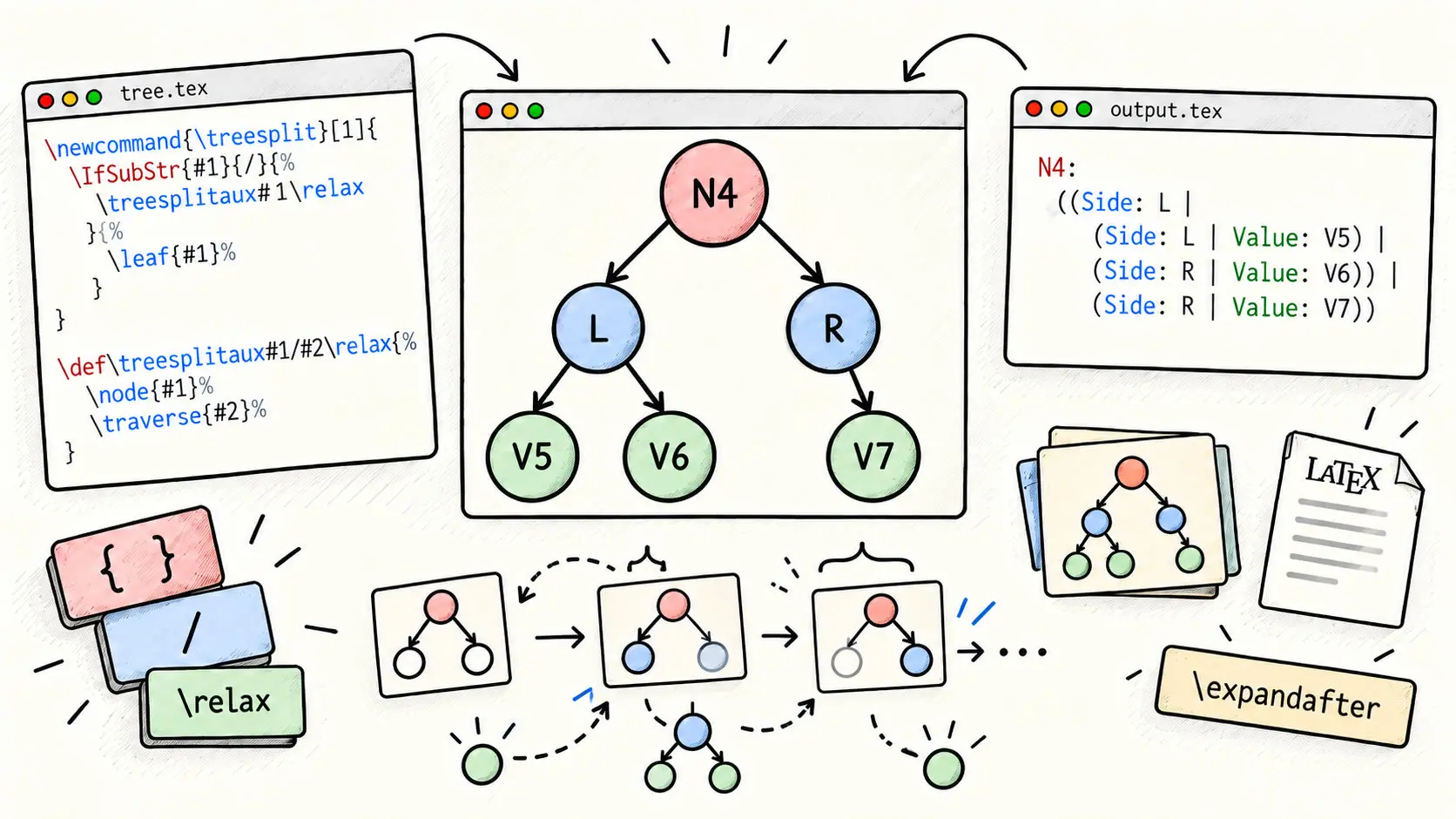
At the end of the article, you'll be able to traverse a tree in pure TeX.
First, remember the basics.
\def\a{Rémi}
\def\b{Julien}
Then, use it as:
Bonjour \a\ et \b.
Bonjour \a{} et \b.
Each one outputs the same result.
"Bonjour Rémi et Julien."
And yess, that is strange that we can call the variable like a comand with empty {}.
Speaking of commands, they are in fact, like said before, fancy variables with fancy logic.
\newcommand{\hello}[3]{Hello #1, #2 et #3}
Used like:
\hello{Rémi}{Julien}{Lucas}
Output: "Hello Rémi, Julien et Lucas"
This stays pure expansions...
Now most confusing part of LaTeX.
How to reassign a value to a variable ?
Maybe, you think this is done simply by.
\def\a{\b}
It works if you just use the \a variable after just to outputs its value, it does raw expansion.
\a
Expands to "Julien".
BUT !
When you use it in comparisons functions such as:
\ifx\a\b
YES
\else
NO
\fi
Is \a definitions equals to \b. -> "NO"
It is another thing entirely.
In fact this function does not expand any of the variabe, but just checks for the last definition value.
So, the right way to REDEFINE, that's the word lol, a variable, is using \edef.
Example:
\edef\a{\b}
\ifx\a\b
YES
\else
NO
\fi
Outputs "YES".
\gdef is like \def but survives any scope {...}
\xdef is like \edef but survives any scope {...}
I already introduced you to comparisons function with \ifx.
Its synthax is:
\ifx\VAR\OTHERVAR
CODE1
\else
CODE2
\fi
Or just.
\ifx\VAR\OTHERVAR
CODE1
\fi
From xstring package we can use this function too:
\IfStrEq{CONTENT1}{CONTENT2}{CODESUCCESS}{CODEFAILURE}
Expanding, for example to:
\IfStrEq{\a}{Rémi}{YES}{NO}
Often better practice.
"For now, that is just for variable raw definition comparison, but would'nt it be cool if we had smarter comparisons functions that gets the type of what we are comparing and accept operators ??"
"Idk, maybe like comparing variables that can be interpreted as numbers right ?"
It EXISTS !
Introducing \ifnum.
\ifnum 5 > 3
YES
\else
NO
\fi
--> "YES"
\ifnum 5 = 3
OUI
\else
NO
\fi
--> "NO"
\ifnum 5 < 3
OUI
\else
NO
\fi
--> "NO"
You can also compare length, neat, but i can not find a comon scenario where it is necessary.
Maybe when you have a work and that you change dimensions (stored in a variable) on the fly to see what formatting works the best.
\ifdim 2cm>1cm
YES
\else
NO
\fi
--> "YES"
Now introducing the most basic if comparison function... the \ifBOOLEAN.
\iftrue
YES\_A
\fi
--> "YES_A"
\iffalse
YES\_B
\fi
--> NOTHING
Why am i bringing that onto the table, because of a way to manipulate boolean variables.
We declare them like that:
\newif\ifcool
The variable name is cool.
The synthax is weird:
\newif\ifVARNAME
Now we set its boolean value doing so:
\VARNAMEBOOLEANVALUE
Expanding to, for example:
\cooltrue
And after its expansions that does not even require the infamous \, we can use it in basic boolean comparison if.
\ifcool
YES
\else
NO
\fi
--> "YES"
After.
\coolfalse
\ifcool
YES
\else
NO
\fi
--> "NO"
Now look at that.
\def\coolbtrue{\let\coolb\iftrue}
\def\coolbfalse{\let\coolb\iffalse}
\coolbtrue
\coolb
YESA
\else
NOA
\fi
\coolbfalse
\coolb
YESB
\else
NOB
\fi
First, outputs "YESA" then "NOB".
Why ?
Because we used \let.
\let\a\b
Tells TeX to make \a behave exactly the same as \b. --> SAME TOKEN
Now a basic thing, check emptyness of variable.
\def\x{}
\ifx\x\empty
EMPTY
\else
NOT EMPTY
\fi
--> "EMPTY"
Loops
\foreach \xb in {1,2,3,4} {
\IfStrEq{\xb}{4}{END}{Value: \xb \\}
}
Outputs:
Value: 1
Value: 2
Value: 3
END
Or we can also define the variable list we will iterate on.
\def\lst{1A,2B,3C,4E}
\foreach \xb in \lst {
\IfStrEq{\xb}{4}{END}{Value: \xb \\}
}
Outputs:
Value: 1A
Value: 2B
Value: 3C
Value: 4D
So, you get it, elements must be separated by a comma.
You can even append to a list, look we create \lstb list and append elements to it using the expansion property of \edef.
\def\lstb{}
\edef\lstb{\lstb 1}
\edef\lstb{\lstb,2}
\edef\lstb{\lstb,2}
\edef\lstb{\lstb,3}
\foreach \xb in \lstb {
\IfStrEq{\xb}{4}{END}{Value: \xb \\}
}
Outputs:
Value: 1
Value: 2
Value: 3
Value: 4
Neat !
But, wait wait wait, there is so much more, hope you are ready !
Pattern Matching
Hang up your belt, because here we enter a special zone.
Look at this:
We first define a list containing key values pairs, defined as (key/value).
Note the / --> IMPORTANT !!!
\def\pairs{{A/1},{B/2},{C/3},{D/4}}
Then the loop.
\foreach \x/\y in \pairs {
\x : \y \\
}
Outputs:
A: 1
B: 2
C: 3
D: 4
YESSS, Pattern matching, that's right !!
That opens an enormous amount of possibilities !
At this point it is a bit like haskell haha.
To emphasize this concept i made this example.
\def\pairsb{{A/1/A1},{B/2/B2},{C/3/C3},{D/4/D4}}
\foreach \x/\y/\z in \pairsb {
\x : \y : \z \\
}
Outputs:
A: 1: A1
B: 2: B2
C: 3: C3
D: 4: D4
Or this one.
\def\pairsb{{A/{1/A1}},{B/{2/B2}},{C/{3/C3}},{D/{4/D4}}}
Note that here, we don't mind \edef because what matters in the loop is the value, not the last definition, because the pattern matching automatically expands the element.
Also note that here instead of having all on the same level, we scoped the inner level between {...} allowing for the TeX tokenizer to match a whole group as one entity and to pass this entity to a function ( \splittemp) that will discover further subgroups with pattern matching (decomposition).
Then, we declare a macro that does pattern matching on its input literally, not even a \newcommand, no just plain old \def.
\def\splittemp#1/#2-{
\x : #1 - #2 \\
}
It actually splits its input by the pattern matching in finds and assign a variable position to each group it made after the patter match ( #1 and #2).
So, finaly the loop:
\foreach \x/\temp in \pairsb {
\expandafter\splittemp\temp-
}
Yess it is literally giving the input to the macro expanding the group pattern matched by the loop, so it expands \temp to its actual value.
Normally when we call a macro, we expects it to be automatically expanded, but here \expandafter is an insurance.
Thanks to \expandafter\A\B that does expands \B before giving it to \A.
Here:
\expandafter\splittemp\temp-
Note that we gave a last separator, being - at the end to correcty create the group #2.
Ouputs:
A: 1 - A1
B: 2 - B2
C: 3 - C3
D: 4 - D4
We could have done the - trick with a token that is used often to do that, it has no visual existance, it just exists in the TeX tokenizer.
Introducing \relax.
\def\splittemp#1/#2\relax{
\x : #1 - #2 \\
}
\foreach \x/\temp in \pairsb {
\expandafter\splittemp\temp\relax
}
Ouputs:
A: 1 - A1
B: 2 - B2
C: 3 - C3
D: 4 - D4
Tree Expansion Example
Okok, here is a list of trees:
\def\pairsc{{N1/{L/V1}},{N2/{R/V2}},{N3/{{L/V3}/{R/V4}}},{N4/{{L/{{L/V5}/{R/V6}}}/{R/V7}}}}
Each tree is:
{NODE/{(L/NODE)/(R/NODE)}}
Where a NODE is a subtree, so it is also:
{NODE/{(L/NODE)/(R/NODE)}}
Expanding to, for example:
{N4/{{L/{{L/V5}/{R/V6}}}/{R/V7}}}
You note that each subtree has its own scope.
Now, the recursivity traversal, how do we think about it ?
First, we think about what is going on when we encounter a leaf, the end path for the tree.
There are two possibilities for a leaf with this tree semantics, wether we encounter the final Side or Value.
So the macro should be.
\newcommand{\treeleaf}[1]{
\IfStrEq{#1}{L}
{Side: #1}
{
\IfStrEq{#1}{R}
{Side: #1}
{Value: #1}
}
}
If L -> that is a Side, so we output "Side: " and its side, wether "L" (Left) or "R" (Right).
And if no "L" or "R", then that's the value, so "Value: " and its value is outputed.
So the missing piece for enabling a recursivity is a macro that cals itself with, as input the subhroup it just find after the patter matching, or calls \treeleaf if it detects that the subgroup is a leaf.
It is exactly what we are going to do except that we will declare two macros that will call eachother following this logic.
\newcommand{\treesplit}[1]{
\IfSubStr{#1}{/}
{
\expandafter\treesplitaux#1\relax
}
{
\treeleaf{#1}
}
}
\def\treesplitaux#1/#2\relax{
(
\treesplit{#1}
/
\treesplit{#2}
)
}
Nothing more to add, you should be able to understand what is going on.
"Wait a minute, are you sure about that?"
"Think again, about the distinction between scoping and raw toekns."
And yess, the subtelty, if we keep this code unchanged, we make a big mistake.
at this stage, you are maybe thinking, that it makes perfect sense, the grouping decomposition made by the patter matching here is fine:
\expandafter\treesplitaux#1\relax
Where \treesplitaux is just:
\def\treesplitaux#1/#2\relax{
(
\treesplit{#1}
/
\treesplit{#2}
)
}
But in fact this is not.
In fact, here the \expandafter is necessary but not sufficient.
It correctly is an insurance to make #1 expands to its value to something like: {1/A1}.
But, it stays scoped !
So this part:
\treesplitaux#1/#2\relax
Never sees the /, so it can not do a proper group decomposition.
Then, the chance we have is that { and } are character, like others.
So, we can manually descope the content to make the function behave as intended.
Because, if we do not do that, we will have weird results, and maybe even outputing some unconsumed tokens --> not in the expected formatting.
The correct code is:
\newcommand{\treesplit}[1]{%
\def\TreeTmp{#1}
\IfBeginWith{\TreeTmp}{\{}{
\StrGobbleLeft{\TreeTmp}{1}[\TreeTmpA]
\StrGobbleRight{\TreeTmpA}{1}[\TreeTmp]
}{}
\IfSubStr{\TreeTmp}{/}
{
\expandafter\treesplitaux\TreeTmp\relax
}
{
\treeleaf{\TreeTmp}
}
}
\def\treesplitaux#1/#2\relax{%
( \treesplit{#1} | \treesplit{#2} )%
}
No changes to \treesplitaux, but what are the changes brought to \treesplit?
First we just assign the parameter to a value:
\def\TreeTmp{#1}
And what do we do with it ?
If it begins with { --> scoped --> need to descope manualy removing manualy first (left) and last (right) char.
That's why we got this in the conditional code.
\StrGobbleLeft{\TreeTmp}{1}[\TreeTmpA]
\StrGobbleRight{\TreeTmpA}{1}[\TreeTmp]
We assign to newly created variable \TreeTmpA the \TreeTmp variable without its first character ( 1 and Left) ( {).
Then we assign \TreeTmpA back to \TreeTmp without its last character ( 1 and Right).
After, we apply logic to get if we are at leaf or not, so we continue recursive call.
For this, we have to check if / is a substring of \TreeTmp.
\IfSubStr{\TreeTmp}{/}
{
\expandafter\treesplitaux\TreeTmp\relax
}
{
\treeleaf{\TreeTmp}
}
Now, the real question "What came first ? The egg or the chicken ?"
Idk, but the analogy for those 2 macros is of course \treesplit, because we theorically could have a tree composed only with a leaf.
So, in the loop for traversing all the trees, we do the following:
\foreach \x/\temp in \pairsc {
\x : \expandafter\treesplit\temp \\
}
Hmm, not exactly right.
Why because here incorrect argument passing, it is like this example:
\def\B{123}
\def\A#1{[#1]}
\expandafter\A\B
Which outputs:
[1]23
Why, because it has no meaning of what the argument is, because ther is no scoping for that argument which is as we know 123.
But here acts weirdly, at first thinks it is the first letter 1 and for the second call, gets the rest of the letters 23.
Then maybe try.
\foreach \x/\temp in \pairsc {
\x : \treesplit{\temp}\par
}
--> FAILS
In fact in \foreach ( pgffor package), the passing of macro created by pgffor are a little weird so when we pass it to a \newcommand, we do that:
\foreach \x/\temp in \pairsc {
\x : \expandafter\treesplit\expandafter{\temp} \\
}
Expands \temp after the token { and then add token }. --> Literally like a \treesplit{...} arg passing but here we just assure that the expansion hapens on \temp.
Final beautiful tree output:
N1: ( Side: L | Value: V1 )
N2: ( Side: R | Value: V2 )
N3: ( ( Side: L | Value: V3 ) | ( Side: R | Value: V4 ) )
N4: ( ( Side: L | ( ( Side: L | Value: V5 ) | ( Side: R | Value: V6
) ) ) | ( Side: R | Value: V7 ) )
WOW, traversing a Tree in LateX, something i will remember !