This article is a part of my full LaTeX guide here article
Here some captions of the game:
How did i create the game ?
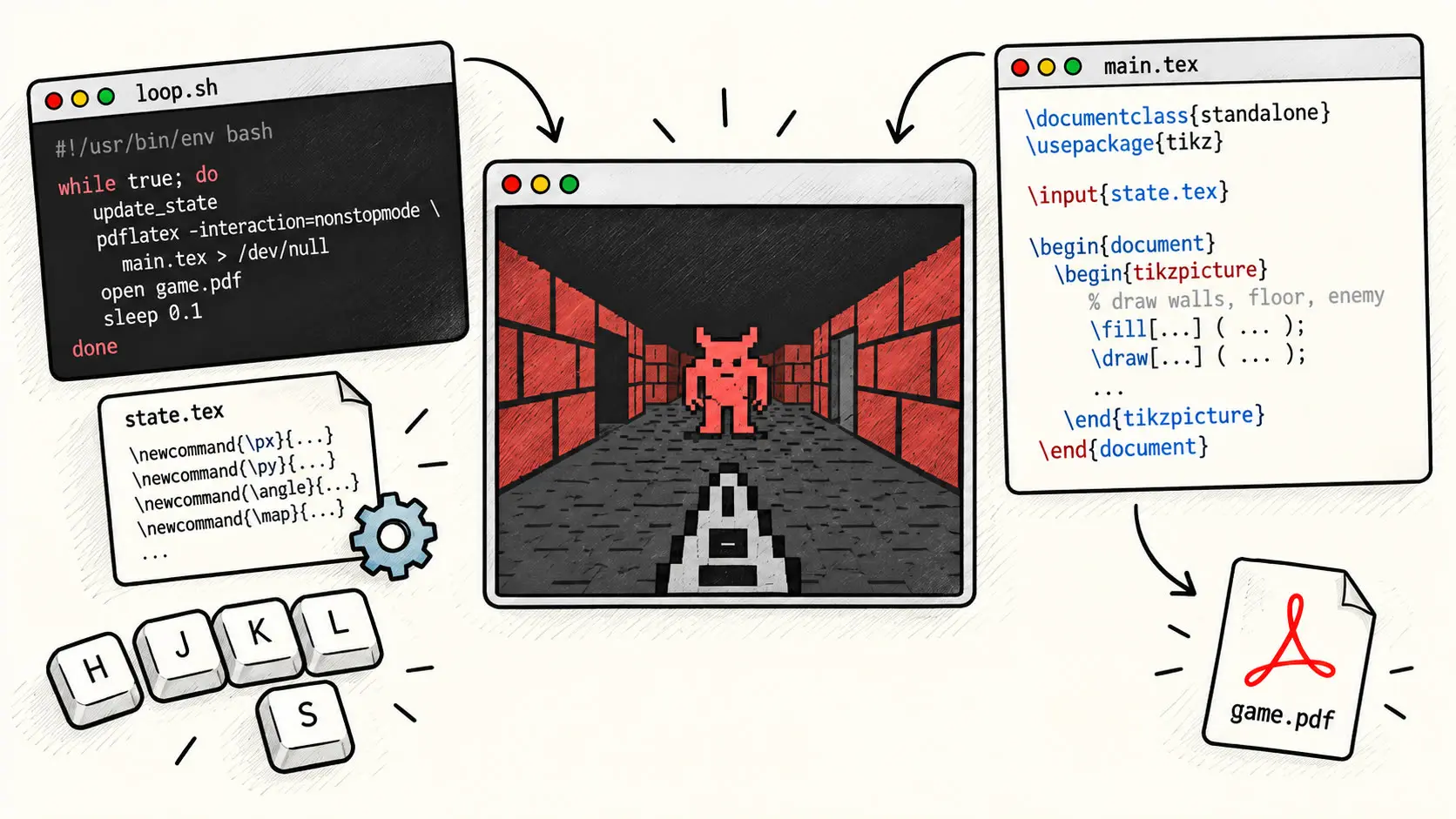
First, the architecture.
We have a bash loop script ( loop.sh) that waits for inputs.
When it receives input, it updates a state.tex variables.
This file is in fact an \input{...} of the main LaTeX file main.tex.
We won't focus on the bash file, but here is its code:
#!/bin/bash
# --- INPUT SETUP ---
exec 3</dev/tty
stty -icanon -echo
trap "stty sane" EXIT
# --- STATE ---
step=0
scaleval=0.5
shoot=0
demon=0
gameover=0
lst="0,1,2"
score=0
# --- SCALE PER STEP ---
update_scale() {
case $step in
0) scaleval=0.5 ;;
1) scaleval=0.9 ;;
2) scaleval=1.4 ;;
esac
}
# --- DEMON SPAWN ---
spawn_demon() {
# 30% chance
if (( RANDOM % 100 < 70 )); then
demon=1
echo "DEMON SPAWN"
else
demon=0
fi
}
# --- RESET ---
reset_game() {
step=0
shoot=0
demon=0
gameover=0
turndir=0
lst="0,1,2"
score=0
update_scale
}
# --- WRITE STATE ---
write_state() {
cat > state.tex <<EOF
\def\step{$step}
\def\lst{$lst}
\def\scaleval{$scaleval}
\def\shoot{$shoot}
\def\demon{$demon}
\def\gameover{$gameover}
\def\score{$score}
\def\turndir{$turndir}
EOF
}
# --- RENDER ---
render() {
pdflatex -interaction=nonstopmode main.tex > /dev/null < /dev/null
}
# --- INIT ---
reset_game
update_scale
write_state
render
while true; do
update=0
key=""
read -u 3 -rsn1 -t 0.1 key
# reset shoot each frame
shoot=0
turndir=0
case "$key" in
k) # forward
if [ "$gameover" -eq 0 ]; then
if [ "$step" -lt 2 ]; then
step=$((step + 1))
echo "FORWARD -> step=$step"
if [ "$step" -eq 2 ]; then
spawn_demon
fi
fi
fi
update=1
;;
j) # backward
if [ "$gameover" -eq 0 ]; then
if [ "$step" -gt 0 ]; then
# leaving step 2 -> check demon
if [ "$step" -eq 2 ] && [ "$demon" -eq 1 ]; then
echo "DEMON GOT YOU"
gameover=1
fi
step=$((step - 1))
echo "BACK -> step=$step"
fi
fi
update=1
;;
l) # right turn
if [ "$step" -eq 2 ] && [ "$gameover" -eq 0 ]; then
if [ "$demon" -eq 1 ]; then
echo "TURNED WITH DEMON -> DEAD"
gameover=1
else
echo "TURN RIGHT"
turndir=2
write_state
render
turndir=0
sleep 0.3
step=0
fi
fi
update=1
;;
h) # left turn
if [ "$step" -eq 2 ] && [ "$gameover" -eq 0 ]; then
if [ "$demon" -eq 1 ]; then
echo "TURNED WITH DEMON -> DEAD"
gameover=1
else
echo "TURN LEFT"
turndir=1
write_state
render
turndir=0
sleep 0.5
step=0
fi
fi
update=1
;;
s) # shoot
if [ "$step" -eq 2 ] && [ "$demon" -eq 1 ]; then
echo "DEMON KILLED"
demon=0
shoot=1
score=$((score+1))
fi
update=1
;;
r)
echo "RESET"
reset_game
update=1
;;
q)
echo "QUIT"
exit 0
;;
esac
if [[ "$step" -eq 0 ]]; then
lst="0,1,2"
fi
if [[ "$step" -eq 1 ]]; then
lst="0,1"
fi
if [[ "$step" -eq 2 ]]; then
lst="0"
fi
if [[ "$update" -eq 1 ]]; then
update_scale
write_state
render
sleep 0.1
fi
done
Now the LaTeX file.
\documentclass{article}
\usepackage{tikz}
\usepackage{pgfplots}
\usepackage{xcolor}
\usepackage{graphicx}
\pgfplotsset{compat=1.18}
\pagecolor{red!20!black}
\begin{document}
\input{state.tex}
\begin{center}
\begin{tikzpicture}[scale=\scaleval]
\pgfmathsetmacro{\W}{15}
\pgfmathsetmacro{\H}{8}
%\fill[red!20!black] (-0.0 * \W, -0.9 * \H) rectangle (\W + 0.0 * \W, \H + 0.9 * \H);
\pgfmathsetmacro{\N}{9 - 2*\step}
\pgfmathsetmacro{\cell}{\W / \N}
\pgfmathsetmacro{\mid}{(\N - 1) / 2}
\pgfmathsetmacro{\xA}{\mid * \cell}
\pgfmathsetmacro{\xB}{(\mid + 1) * \cell}
% make it square
\pgfmathsetmacro{\size}{\xB - \xA}
\pgfmathsetmacro{\yA}{(\H - \size)/2}
\pgfmathsetmacro{\yB}{\yA + \size}
\draw[thick, fill=red!15!black] (\xA,\yA) rectangle (\xB,\yB);
% drawing wall
\pgfmathsetmacro{\sizeRef}{\size}
\pgfmathsetmacro{\xALast}{\xA}
\pgfmathsetmacro{\xBLast}{\xB}
\pgfmathsetmacro{\yALast}{\yA}
\pgfmathsetmacro{\yBLast}{\yB}
\foreach \i in \lst {
\pgfmathsetmacro{\offset}{\size * (2^\i)}
\pgfmathsetmacro{\yext}{\offset / 2}
\ifcase\i
\def\wallcolor{black}
\else
\pgfmathsetmacro{\shade}{int(2 + 15*\i)}
\edef\wallcolor{red!\shade!black}
\fi
% LEFT
\pgfmathsetmacro{\xAi}{\xALast - \offset}
\fill[fill=\wallcolor, draw=black]
(\xAi,\yALast-\yext)
-- (\xAi,\yBLast+\yext)
-- (\xALast,\yBLast)
-- (\xALast,\yALast)
-- cycle;
% RIGHT
\pgfmathsetmacro{\xBi}{\xBLast + \offset}
\fill[fill=\wallcolor, draw=black]
(\xBi,\yALast-\yext)
-- (\xBi,\yBLast+\yext)
-- (\xBLast,\yBLast)
-- (\xBLast,\yALast)
-- cycle;
% GROUND
\fill[fill=red!20!black, draw=black]
(\xALast,\yALast)
-- (\xBLast,\yALast)
-- (\xBi,\yALast - \yext)
-- (\xAi,\yALast - \yext)
-- cycle;
% CEILING
\fill[fill=red!20!black, draw=black]
(\xALast,\yBLast)
-- (\xBLast,\yBLast)
-- (\xBi,\yBLast + \yext)
-- (\xAi,\yBLast + \yext)
-- cycle;
\pgfmathparse{\xALast - \offset}
\xdef\xALast{\pgfmathresult}
\pgfmathparse{\xBLast + \offset}
\xdef\xBLast{\pgfmathresult}
\pgfmathparse{\yALast - \yext}
\xdef\yALast{\pgfmathresult}
\pgfmathparse{\yBLast + \yext}
\xdef\yBLast{\pgfmathresult}
}
\pgfmathsetmacro{\weaponY}{\yALast / \scaleval}
\pgfmathsetmacro{\demonY}{\weaponY + 0.1 * \H}
\ifnum\demon=1
\node at ({\W/2}, {\demonY}) {
\includegraphics[width=6 cm]{demon.png}
};
\fi
\ifnum\shoot=0
\node at ({\W/2}, {\weaponY}) {
\includegraphics[width=6 cm]{weapon.png}
};
\else
\node at ({\W/2}, {\weaponY}) {
\includegraphics[width=6 cm]{weapon_shoot.png}
};
\fi
\ifnum\gameover=1
\node[white, scale=3] at ({\W/2}, {\H/2}) {GAME OVER};
\node[red!70!black, scale=3] at ({\W/2}, {\H/2 + 1}) {SCORE: \score};
\fi
\ifnum\turndir=1
\fill[white]
({\W/2 - 2}, {\H/2})
-- ({\W/2}, {\H/2 + 1})
-- ({\W/2}, {\H/2 - 1})
-- cycle;
\fi
\ifnum\turndir=2
\fill[white]
({\W/2 + 2}, {\H/2})
-- ({\W/2}, {\H/2 + 1})
-- ({\W/2}, {\H/2 - 1})
-- cycle;
\fi
\end{tikzpicture}
\end{center}
\end{document}
There is really no new thing when it comes to the synthax apart from:
\pagecolor{red!20!black}
Allowing to change the ENTIRE background color of the document --> redish here.
All is based on vanishing line to create depth illusion.
So the basic idea is to draw a centered square, and 4 vanishing lines that starts at each square corner and that ... vanishes to the exterior.
-
top-left corner -> vanishing line that goes to top-left
-
top-right corner -> vanishing line that goes to top-right
-
bottom-left corner -> vanishing line that goes to bottom-left
-
bottom-right corner -> vanishing line that goes to bottom-right
First, we declare a Width ( W) and a Height ( H) variables, assign them respectively max Width and respectable Height value.
\pgfmathsetmacro{\W}{15}
\pgfmathsetmacro{\H}{8}
After that we calculates N.
\pgfmathsetmacro{\N}{9 - 2*\step}
What is N ?
Its value whole purpose is to compute the coordinates of the centered square.
I explain.
If you are in front of a wall, it will apear bigger (width and height proportionally) than when you are farer from it.
Because we will use N as:
\pgfmathsetmacro{\cell}{\W / \N}
Which gives us width of units (called \cell) we can work with.
The more there are units, the less wide they become ( \W is a constant = 15).
Also, note that the more steps we have done, the closer we get to the wall / square.
Then, the lower is N the less units are and they are wider.
I spoke about units, so now, the trick is to compute the middle that tells, how many units i need to get to the middle unit.
\pgfmathsetmacro{\mid}{(\N - 1) / 2}
Here is the thing, i do not mean middle, i said the unit that is in the middle, like a median.
This is key, because the start coordinate of the middle unit when i'm close to the wall (so step is high), is the coordinate of one of the firsts units when i'm far from the wall (step made lower).
After realizing that, it's simple, i just compute the x coordinate of the startig unit and ending x of the width --> x start and end of the square.
\pgfmathsetmacro{\xA}{\mid * \cell}
\pgfmathsetmacro{\xB}{(\mid + 1) * \cell}
You see, x end of the square is just the x start of the next width unit.
(\mid + 1) * \cell
So, the size of the edges of the square is just the difference.
\pgfmathsetmacro{\size}{\xB - \xA}
Now we compute y start and y end.
\pgfmathsetmacro{\yA}{(\H - \size)/2}
\pgfmathsetmacro{\yB}{\yA + \size}
So ( \xA,\yA) is actually bottom-left of the square.
After that, we draw the square.
\draw[thick, fill=red!15!black] (\xA,\yA) rectangle (\xB,\yB);
Wall - Vanishing lines
Now most interesting part.
Look at the state.tex file:
\def\step{1}
\def\lst{0,1}
\def\scaleval{0.9}
\def\shoot{0}
\def\demon{1}
\def\gameover{1}
\def\score{2}
\def\turndir{0}
What is important is the evolution of \step, \lst and \scaleval
For \step == 0.
\scaleval= 0.5\lst= 0,1,2 --> 3 walls
For \step == 1.
\scaleval= 0.9\lst= 0,1 --> 2 walls
For \step == 2.
\scaleval= 1.4\lst= 0,1,2 --> 1 wall
\lst is just a list of numbers, what is important is its length, so it defines the iteration number in the next loop.
\scaleval is also important, because wo so not want the user to zoom in the PDF viewer (like zathura) we scale appropriately the scenes.
The \scaleval are "trust me bros" variables, but works.
The only "trust me bro" part in this article :)
Now the drawing walls part.
\pgfmathsetmacro{\xALast}{\xA}
\pgfmathsetmacro{\xBLast}{\xB}
\pgfmathsetmacro{\yALast}{\yA}
\pgfmathsetmacro{\yBLast}{\yB}
\foreach \i in \lst {
\pgfmathsetmacro{\offset}{\size * (2^\i)}
\pgfmathsetmacro{\yext}{\offset / 2}
\ifcase\i
\def\wallcolor{black}
\else
\pgfmathsetmacro{\shade}{int(2 + 15*\i)}
\edef\wallcolor{red!\shade!black}
\fi
% LEFT
\pgfmathsetmacro{\xAi}{\xALast - \offset}
\fill[fill=\wallcolor, draw=black]
(\xAi,\yALast-\yext)
-- (\xAi,\yBLast+\yext)
-- (\xALast,\yBLast)
-- (\xALast,\yALast)
-- cycle;
% RIGHT
\pgfmathsetmacro{\xBi}{\xBLast + \offset}
\fill[fill=\wallcolor, draw=black]
(\xBi,\yALast-\yext)
-- (\xBi,\yBLast+\yext)
-- (\xBLast,\yBLast)
-- (\xBLast,\yALast)
-- cycle;
% GROUND
\fill[fill=red!20!black, draw=black]
(\xALast,\yALast)
-- (\xBLast,\yALast)
-- (\xBi,\yALast - \yext)
-- (\xAi,\yALast - \yext)
-- cycle;
% CEILING
\fill[fill=red!20!black, draw=black]
(\xALast,\yBLast)
-- (\xBLast,\yBLast)
-- (\xBi,\yBLast + \yext)
-- (\xAi,\yBLast + \yext)
-- cycle;
\pgfmathparse{\xALast - \offset}
\xdef\xALast{\pgfmathresult}
\pgfmathparse{\xBLast + \offset}
\xdef\xBLast{\pgfmathresult}
\pgfmathparse{\yALast - \yext}
\xdef\yALast{\pgfmathresult}
\pgfmathparse{\yBLast + \yext}
\xdef\yBLast{\pgfmathresult}
}
In fact, it computes x offset and y offset that is the half of the first.
x offset evolves as 2^step, and that is just the offset from the last wall ! --> Strong vanishing lines
\pgfmathsetmacro{\offset}{\size * (2^\i)}
\pgfmathsetmacro{\yext}{\offset / 2}
"Why are they computed ?"
To compuet wall coordinates and drawing them.
% LEFT
\pgfmathsetmacro{\xAi}{\xALast - \offset}
\fill[fill=\wallcolor, draw=black]
(\xAi,\yALast-\yext)
-- (\xAi,\yBLast+\yext)
-- (\xALast,\yBLast)
-- (\xALast,\yALast)
-- cycle;
After that, the variables are of course updated thanks to \pgfmathparse that alows to compute formulas, and \xdef for the definition.
\pgfmathparse{\xALast - \offset}
\xdef\xALast{\pgfmathresult}
\pgfmathparse{\xBLast + \offset}
\xdef\xBLast{\pgfmathresult}
\pgfmathparse{\yALast - \yext}
\xdef\yALast{\pgfmathresult}
\pgfmathparse{\yBLast + \yext}
\xdef\yBLast{\pgfmathresult}
We also compute a color gradient of the right and left walls by their depth - step made.
\ifcase\i
\def\wallcolor{black}
\else
\pgfmathsetmacro{\shade}{int(2 + 15*\i)}
\edef\wallcolor{red!\shade!black}
\fi
At this point, i discovered that if i do the same for the top and bottom, it really gets awful visually, so i keep the same color for whole bottom and top and just apply gradient for walls.
For other stuffs.
We got some basics boolean logic.
Add the deamon png.
\ifnum\demon=1
\node at ({\W/2}, {\demonY}) {
\includegraphics[width=6 cm]{demon.png}
};
\fi
When firering the weapon, we replace the png for certain amounts of frames by the a variant png.
\ifnum\shoot=0
\node at ({\W/2}, {\weaponY}) {
\includegraphics[width=6 cm]{weapon.png}
};
\else
\node at ({\W/2}, {\weaponY}) {
\includegraphics[width=6 cm]{weapon_shoot.png}
};
\fi
Same for making appear a left or right arrow when choosing a direction.
\ifnum\turndir=1
\fill[white]
({\W/2 - 2}, {\H/2})
-- ({\W/2}, {\H/2 + 1})
-- ({\W/2}, {\H/2 - 1})
-- cycle;
\fi
\ifnum\turndir=2
\fill[white]
({\W/2 + 2}, {\H/2})
-- ({\W/2}, {\H/2 + 1})
-- ({\W/2}, {\H/2 - 1})
-- cycle;
\fi
And gameover screen, with score.
\ifnum\gameover=1
\node[white, scale=3] at ({\W/2}, {\H/2}) {GAME OVER};
\node[red!70!black, scale=3] at ({\W/2}, {\H/2 + 1}) {SCORE: \score};
\fi
Hope you found this article useful !
!! Ciao Ciao !!