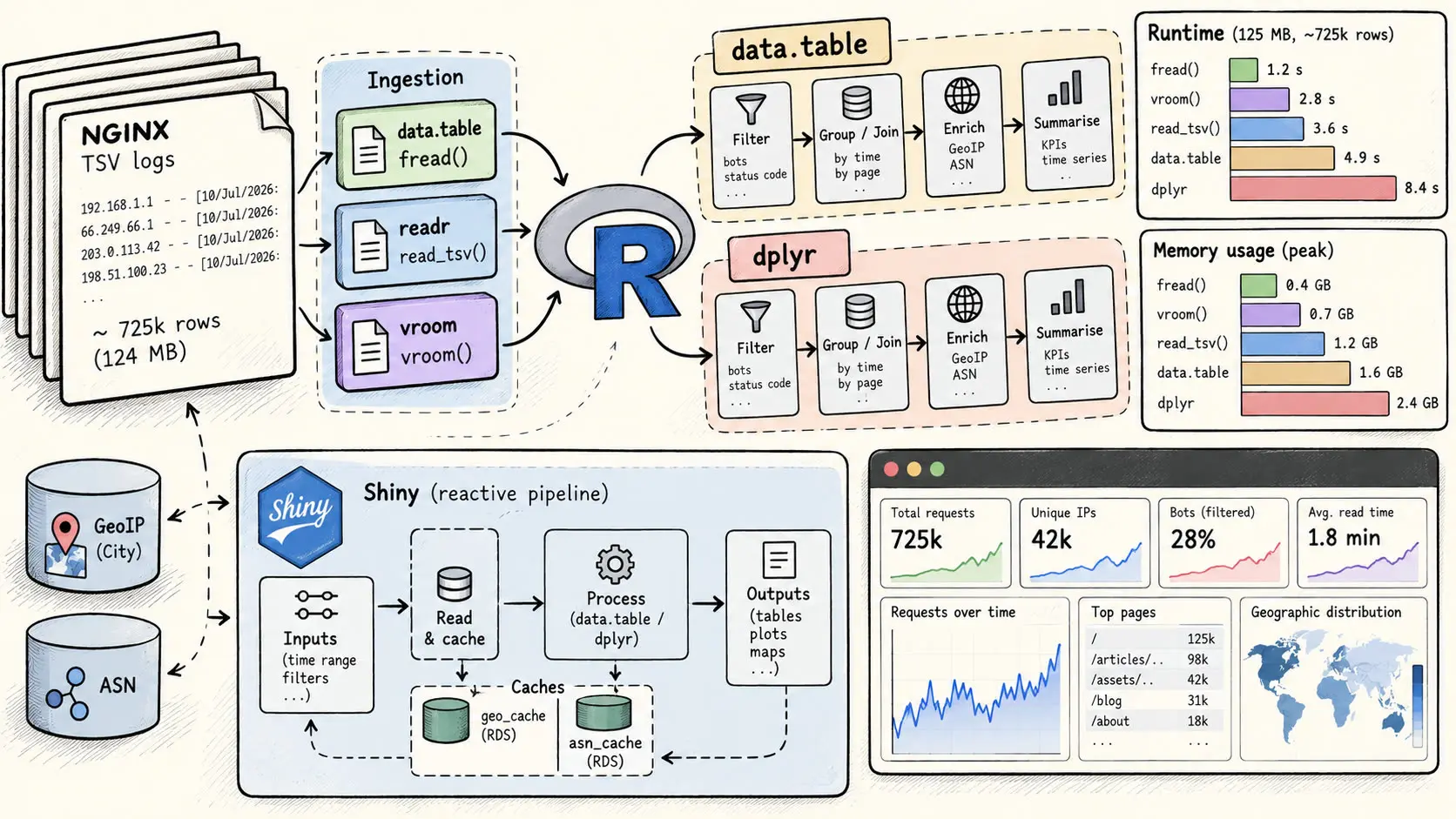
Recently, I wanted to create an analytical dashboard for the visits on this blog, entirely server-side.
This means reading the NGINX /var/log/statix.log file, reducing bot noise as precisely as possible, and outputting useful visualizations.
I know that some libraries, like Streamlit in Python, allow this kind of analysis, but at the time, I was way more comfortable with R.
My first version was absolutely awful in terms of performance, not only because I used dplyr, which is a good dataframe engine and noticeably better than base R’s dataframe engine, but also because of a completely awful execution order.
In this article, I will not only show you the exact performance difference between the dplyr and data.table implementations, but also show you how much execution order matters in a real data pipeline.
One important distinction in this benchmark is the difference between data ingestion and data manipulation. Ingestion is the part where the raw log file is parsed into R, using tools such as readr::read_tsv(), vroom::vroom(), or data.table::fread(). Data manipulation is the part where the loaded data is filtered, grouped, joined, and summarised.
This distinction matters because a pipeline can be fast at reading but slower once real transformations start, or the opposite. So I will benchmark both the ingestion layer and the actual transformation layer separately.
So we will benchmark dplyr and data.table for the manipulation steps, and readr, vroom, and data.table for the ingestion step.
We will also benchmark the transition step, which matters a lot when lazy parsing is involved.
We will see that data.table slightly wins (by 29% in execution time) and why.
The memory consumptions of ingestion and data manipulation backends will also be compared (lazy VS eager etcetera).
We wil also see how dplyr and data.table codes can be optimized.
The code whole code is available here as a zip:
Important note: this article is not meant to be a universal dplyr vs data.table benchmark.
The timings are placed directly around the pipeline steps:
t <- Sys.time()
function_call()
log_step("name of the step", t, df)
As you see here how-ill-benchmark-
So the measured numbers are for the data pipeline itself: ingestion, filtering, grouping, joins, and aggregations. They are not measuring Shiny UI rendering or plot rendering.
Shiny is mentioned because it is the real environment where this pipeline runs, and because it explains why recomputation latency matters. In an interactive dashboard, even differences that may look small in isolation can affect responsiveness.
The dataset is also not meant to represent “big data”. It contains around 725k rows for a 124 MB TSV file, which is representative of my actual production log file because it is capped with logrotate.
The point of the article is therefore not to produce a universal ranking of R dataframe tools, but to analyze this specific real-world workload and understand where the performance differences come from.
What are we even talking about
We define the log format in /etc/nginx/nginx.conf, in the http {...} block as a TSV:
log_format statix_tsv '$remote_addr\t'
'$msec\t'
'$uri\t'
'$status\t'
'$http_user_agent';
And I tell my blog to use this format for the log in the associated server {...} block:
access_log /var/log/nginx/statix.log statix_tsv;
So we got all columns we need to perform our bot filtering heuristics and analysis.
-
$remote_addr-> IPv4 address -
$msec-> seconds since 1st January 1970 (Unix timestamp) -
uri-> The targeted URL -
status-> Status of the request, basically we will only filter on success (code: 200) -
$http_user_agent-> The user agent sent by the client. It is a text string that usually identifies the browser, operating system, device, or bot making the request
Fields are separated by a tab character \\t -> TSV.
RShiny architecture
In a typical RShiny application, you have 3 files.
-
global.R-> set up the global resources that can be accessible from anywhere in the application (variables, functions...) -
ui.R-> describe in R the layouts and send input values to the server / receives computed objects from the server and render them -
server.R-> Runs for each session / is charged to compute values according toglobal.Rresources andui.Rinput values
Reactive variables
We have this code in ui.R:
navset_tab(
nav_panel(
title = "Most Visited Pages",
page_sidebar(
title = "Main Dashboard",
sidebar = tagList(
selectInput(
inputId = "time_unit",
label = "Time Unit",
choices = c("h", "d", "w", "m", "y"),
selected = "h"
),
numericInput(
inputId = "last_n",
label = "Last n units",
value = 72,
min = 1,
step = 1
),
fileInput(
inputId = "upload_asn_mmdb",
label = "Upload GeoLite2-ASN.mmdb",
accept = c(".mmdb"),
multiple = FALSE
),
fileInput(
inputId = "upload_city_mmdb",
label = "Upload GeoLite2-City.mmdb",
accept = c(".mmdb"),
multiple = FALSE
),
uiOutput("mmdb_status")
),
# KPI row + pie
layout_column_wrap(
width = 1/3,
value_box(title = "Total requests", value = textOutput("kpi_hits")),
value_box(title = "Unique IPs", value = textOutput("kpi_ips")),
value_box(title = "Unique pages", value = textOutput("kpi_pages")),
value_box(title = "Median Read Time", value = textOutput("kpi_med_readtime"))
),
value_box(
title = NULL,
value = withSpinner(plotlyOutput("pie_chart"), type = 5, size = 1.3)
)
)
),
nav_panel(
title = "WebPages Accross time",
value_box(
title = NULL,
value = withSpinner(plotlyOutput("graph"), type = 5, size = 1.3)
)
),
nav_panel(
title = "Data Page",
card(
withSpinner(DTOutput("mytable"), type = 5, size = 1.0)
)
),
nav_panel(
title = "ReadTime Page",
card(
withSpinner(DTOutput("read_time"), type = 5, size = 1.0)
)
),
nav_panel(
title = "Geo Map",
card(
withSpinner(
leafletOutput("map", height = 650),
type = 5,
size = 1.2
)
)
)
)
Nothing fancy, just 5 tabs, and on each tab we have a different dataframe visualized / displayed.
But what i want you to think about is locate on the very first tab, here:
selectInput(
inputId = "time_unit",
label = "Time Unit",
choices = c("h", "d", "w", "m", "y"),
selected = "h"
),
numericInput(
inputId = "last_n",
label = "Last n units",
value = 72,
min = 1,
step = 1
),
The default values mean that we want the dashboard to display visits from the last 72 hours. But what happens when I change the time unit or the number?
Of course visualizations will be obsolete.
Then, the client will wait for the new resources to be computed once again since the beginning of the session from the server.
For example KPIs:
layout_column_wrap(
width = 1/3,
value_box(title = "Total requests", value = textOutput("kpi_hits")),
value_box(title = "Unique IPs", value = textOutput("kpi_ips")),
value_box(title = "Unique pages", value = textOutput("kpi_pages")),
value_box(title = "Median Read Time", value = textOutput("kpi_med_readtime"))
),
Will respectively wait for the "kpi_hits", "kpi_ips", "kpi_pages" and "kpi_med_readtime" variable from the server.
At the time we change inputs, a new request is made to server.R to recompute the reactive resources according to the new inputs.
A reactive resource is defined in the server.
This one for example is a reactive resource:
output$mytable <- renderDT({
df <- geo_enriched_data()
req(input$client_tz)
df[, date := format(
lubridate::with_tz(date, tzone = input$client_tz),
"%Y-%m-%d %H:%M:%S"
)
]
data.table::setorder(df, -date)
df[, target := paste0(
'<a href=\"https://julienlargetpiet.tech',
target,
'\" target=\"_blank\">',
target,
"</a>"
)
]
datatable(
df[, .(country,
asn_org,
ip,
date,
target,
time_on_page
)
],
options = list(
pageLength = 100,
scrollX = TRUE,
ordering = TRUE
),
rownames = FALSE,
escape = FALSE
)
})
It is used in he third tabs in the UI.
And now we look at its dependency -> geo_enriched_data().
geo_enriched_data is not a function like the () can make us think of, but a call to recompute this variable.
Now, we'll check on how it is computed / its definition.
geo_enriched_data <- reactive({
t <- Sys.time()
df <- filtered_data()
req(nrow(df) > 0)
ips <- sort(unique(df$ip))
if (!identical(ips, last_ips())) {
geo_data <- lookup_ips(
ips,
db_path = geo_db_path
)
geo_cache_reactive(geo_data)
last_ips(ips)
}
geo <- geo_cache_reactive()
if (!is.null(geo)) {
df <- geo[df, on = "ip"]
}
log_step("GEO Enrichment", t, df)
df
})
We see that its definition is wraped inside a reactive(), because it is a reactive resource.
Meaning it will read and its result will be cached.
If one of the upstream reactive dependencies / node changes, the current reactive resource is marked as invalid. Then, the next time it is read, Shiny recomputes the invalidated part of the dependency graph, while unchanged reactive resources can still return their cached values.
In this case, if filtered_data (a reactive resource) was invalidated / recomputed before, then geo_enriched_data will be invalidated (cache not up to date) and the computation inside the geo_enriched_data will be run again when R will call geo_enriched_data().
Also look at what i have in the filtered_data definition:
filtered_data <- reactive({
mmdb_bump()
}
Meaning that it creates a dependency from a reactive variable called mmdb_bump.
In fact that is a variable that tells when a MaxMindDB file is uploaded, so the IP locations and ASNs are updated:
observeEvent(input$upload_asn_mmdb, {
req(input$upload_asn_mmdb)
src <- input$upload_asn_mmdb$datapath
dst <- asn_db_path
ok <- file.copy(src, dst, overwrite = TRUE)
if (!ok) {
showNotification(paste("Failed to write:", dst), type = "error")
return()
}
clear_ip_caches()
geo_cache_reactive(NULL)
last_ips(character())
mmdb_bump(mmdb_bump() + 1)
showNotification("ASN DB uploaded and installed.", type = "message")
})
That is just a dependency graph.
Limitations
We do not want a live update of the logs in the dashboard.
We just want that in each session / connection to the dashboard, last connections since the last session to be taken in count.
We can't interpolate the number of connections from the time interval of the analysis.
Meaning that if we want to be sure to include all possible connections from the last N hours we need to read the entirety of the logs file for each session which is computationally expensive (to fit it in RAM and / or Cahches)
But to limit the amount of rows we will parse, i have set a logrotate service that limits the current log file to 500MB.
Because each line length changes we can't infer on the total amount of connections we will be able to analyze at max.
Neither on the maximum time interval, because oftenwe got a huge increase of connections in a short range of time (2 to one week for example) and then it come back to normal status.
But in common situations, those won't be a problem.
From my experience, for example i can go as far as last 360 hours.
How I'll benchmark ?
I'm gonna define these functions:
bench_data <- data.frame("seconds" = numeric(),
"nrows" = numeric(),
"name" = character()
)
log_step <- function(name, start, df = NULL) {
elapsed <- as.numeric(difftime(Sys.time(), start, units = "secs"))
if (!is.null(df)) {
nrows <- nrow(df)
cat(sprintf("[filtered_data] %-25s %.4f sec | rows: %s\n",
name,
elapsed,
format(nrows, big.mark = " ")))
} else {
nrows <- NA_integer_
cat(sprintf("[filtered_data] %-25s %.4f sec\n",
name,
elapsed))
}
bench_data <<- rbind(bench_data, data.frame("seconds" = elapsed,
"nrows" = nrows,
"character" = name
)
)
}
write_benchs <- function() {
write.table(x = bench_data,
file = "data_table.result", # or "dplyr_readr.result"
sep = ",",
row.names = FALSE,
col.names = FALSE,
append = TRUe
)
}
And apply this pattern:
t <- Sys.time()
FUNCTION_CALL
log_step("FUNCTION CALL 1", t, df)
And the data will be written after al the data ingestion and manipulation functions have been evaluated, in there:
article_readtime_stats <- reactive({
df <- filtered_data()
t <- Sys.time()
req(nrow(df) > 0)
keep <- df$time_on_page > 3 & df$time_on_page < 3600
df <- df[keep]
df <- df[, .(
median_readtime = median(time_on_page),
valid_reads = .N
),
by = target
]
data.table::setorder(df, -median_readtime)
log_step("READTIME STATS", t, df)
write_benchs() # HERE
bench_data <<- data.frame("seconds" = numeric(),
"nrows" = numeric(),
"name" = character()
)
print(df)
df
})
The data.table and dplyr variant will be executed on the same log file, on the same machine.
The log file is made of 725832 rows and it size is 124M.
The log file is available here if you want to reproduce the benchmark out2.log
The execution time of each function is computed from the median of 9 runs.
After that I just erase the first ingestion call because it is dupplicated due to the connection session that first load global.R -> ingesting data, then when conection succeeds, it reloads global.R -> hence reloading the data ingestion.
So from this:
0.355073213577271,725832,"RAW Ingestion"
0.0164694786071777,725832,"Date mutation"
0.000160455703735352,725832,"Selection"
0.157821416854858,630156,"Filtering"
0.000390052795410156,630156,"Status drop"
0.543130159378052,630156,"Read First" # END OF FIRST INGESTION HERE
0.222374200820923,725832,"RAW Ingestion"
0.0074620246887207,725832,"Date mutation"
5.07831573486328e-05,725832,"Selection"
0.160036563873291,630156,"Filtering"
0.000440120697021484,630156,"Status drop"
0.393628835678101,630156,"Read First"
0.0153741836547852,296178,"Time Window"
0.0221734046936035,296178,"UA Agent Pre"
0.12898850440979,160064,"UA AGENT"
0.0681912899017334,132368,"Asset heuristic"
0.0364055633544922,16354,"Aticle filtering"
0.0061194896697998,3391,"Rate heuristic"
0.00260376930236816,990,"Read time heuristic"
0.00266528129577637,990,"ASN Enrichment"
0.00577926635742188,990,"ASN filtering 1"
0.00215840339660645,990,"ASN filtering 2"
0.000262737274169922,278,"IP Exclusion"
0.000316619873046875,278,"HONEY POTS"
0.00047755241394043,278,"KPI MEDIAN READTIME"
0.0011904239654541,6,"READTIME STATS"
I convert to:
0.238284111022949,725832,"RAW Ingestion"
0.00752401351928711,725832,"Date mutation"
5.48362731933594e-05,725832,"Selection"
0.154783725738525,630156,"Filtering"
0.00042271614074707,630156,"Status drop"
0.404343128204346,630156,"Read First"
0.014697790145874,296178,"Time Window"
0.0220913887023926,296178,"UA Agent Pre"
0.128525018692017,160064,"UA AGENT"
0.0676510334014893,132368,"Asset heuristic"
0.0375986099243164,16354,"Aticle filtering"
0.00586986541748047,3391,"Rate heuristic"
0.00234007835388184,990,"Read time heuristic"
0.00271892547607422,990,"ASN Enrichment"
0.0056302547454834,990,"ASN filtering 1"
0.00212287902832031,990,"ASN filtering 2"
0.00026249885559082,278,"IP Exclusion"
0.000333786010742188,278,"HONEY POTS"
0.000478506088256836,278,"KPI MEDIAN READTIME"
0.00117015838623047,6,"READTIME STATS"
.
.
.
Setup
For this article, i'm using this version of R:
❯ R
R version 4.3.3 (2024-02-29) -- "Angel Food Cake"
Copyright (C) 2024 The R Foundation for Statistical Computing
Platform: x86_64-pc-linux-gnu (64-bit)
And here are the package version I'll use:
> packageVersion("data.table")
[1] ‘1.18.4’
> packageVersion("dplyr")
[1] ‘1.2.1’
> packageVersion("vroom")
[1] ‘1.7.1’
> packageVersion("readr")
[1] ‘2.2.0’
Bots noise reducer
The goal of this part is to remove bots on the fly from our final data without too much false positives and false negatives.
Reading the file
In global.R, we define:
load_raw_data <- function(file_path) {
readr::read_tsv(
file_path,
col_names = c("ip", "ts", "target", "status", "ua"),
col_types = readr::cols(
ip = readr::col_character(),
ts = readr::col_double(),
target = readr::col_character(),
status = readr::col_integer(),
ua = readr::col_character()
),
progress = FALSE
) %>%
mutate(
date = as.POSIXct(ts, origin = "1970-01-01", tz = "UTC")
) %>%
select(ip, date, target, status, ua) %>%
filter(
!is.na(date),
!is.na(target),
!is.na(status),
status == 200
) %>%
select(-status)
}
load_raw_data <- function(file_path) {
vroom::vroom(
file_path,
delim = "\t",
col_names = c("ip", "ts", "target", "status", "ua"),
col_types = vroom::cols(
ip = vroom::col_character(),
ts = vroom::col_double(),
target = vroom::col_character(),
status = vroom::col_integer(),
ua = vroom::col_character()
),
progress = FALSE
) %>%
mutate(
date = as.POSIXct(ts, origin = "1970-01-01", tz = "UTC")
) %>%
select(ip, date, target, status, ua) %>%
filter(
!is.na(date),
!is.na(target),
!is.na(status),
status == 200
) %>%
select(-status)
}
load_raw_data <- function(file_path) {
df <- data.table::fread(input = file_path,
sep="\t",
quote = "\"",
col.names = c("ip", "ts", "target", "status", "ua"),
header = FALSE,
colClasses = list(
character = c(1, 3, 5),
double = 2,
integer = 4
),
showProgress = FALSE
)
df[, date := as.POSIXct(ts, origin = "1970-01-01", tz = "UTC")]
df <- df[, .(ip, date, target, status, ua)]
df <- df[!is.na(date) &
!is.na(target) &
!is.na(status) &
status == 200]
df[, status := NULL]
}
load_raw_data <- function(file_path) {
df <- data.table::as.data.table(vroom::vroom(
file_path,
delim = "\t",
col_names = c("ip", "ts", "target", "status", "ua"),
col_types = vroom::cols(
ip = vroom::col_character(),
ts = vroom::col_double(),
target = vroom::col_character(),
status = vroom::col_integer(),
ua = vroom::col_character()
),
progress = FALSE
))
df[, date := as.POSIXct(ts, origin = "1970-01-01", tz = "UTC")]
df <- df[, .(ip, date, target, status, ua)]
df <- df[!is.na(date) &
!is.na(target) &
!is.na(status) &
status == 200]
df[, status := NULL]
}
And we call it in server.R as:
t <- Sys.time()
raw_data <- load_raw_data(file_path)
log_step("Read First", t, raw_data)
Before i give you my benchmarks, we need to describe the difference between lazy and eager ingestion.
The eager like ingestion engines here are readr::read_tsv() and data.table::fread(), meaning they fully materialize / allocate vectors for each columns, so after the operations return, all the cells values will be in cache.
In the other hand, we have vroom::vroom which is a lazy ingestion function, meaning it will not parse the full file and only cache the log file as plain text data. It is only when the next functions will ask for operation on specific subset of the dataframe, like certain cols, that the specific columns will be parsed / materialized, thus creating a delayed performance cost.
So lazy ingestion function are very powerful when we need to perform operations on a small subset of a huge data file, because only the concerned part will be parsed instead of the whole file which is a waste of computations in those cases.
But is that the case here ?
Not really, you see that just after reading the log file we perform a mutation, creating a column based on the ts column, hence we have to read this col, so parse it.
And if it were only one column why not, but just after that we also perform filtering operations that require parsing target and status.
And if we extrapolate all along the pipeline, we will eventually need to parse all columns.
So here lazy ingestion is at first glance useless and counter productive.
But we need to look further and measure where the materialization cost actually happens. In particular, we need to compare the cost of using the lazy output of vroom::vroom() directly with dplyr transformations, which materialize columns as they are touched, versus forcing materialization upfront with data.table::as.data.table() and then running the data.table pipeline.
Here are the results:
label <- c(
"Read First",
"Time Window",
"UA AGENT",
"Asset heuristic",
"Article filtering",
"Rate heuristic",
"Read time heuristic",
"ASN Enrichment",
"ASN filtering 1",
"ASN filtering 2",
"IP Exclusion",
"HONEY POTS",
"KPI MEDIAN READTIME"
)
cat("\n #### READR + DPLYR #### \n\n")
data <- read.table("dplyr_readr.result",
sep = ",",
header = FALSE
)
cat("\n")
seconds <- as.data.frame(matrix(data$V1,
ncol = length(label),
byrow=TRUE
)
)
colnames(seconds) <- label
cat(paste("Ingestion time:",
median(seconds[, 1]), "\n",
sep = " "))
#### READR + DPLYR ####
Ingestion time 0.3302
label <- c(
"Read First",
"Time Window",
"UA AGENT",
"Asset heuristic",
"Article filtering",
"Rate heuristic",
"Read time heuristic",
"ASN Enrichment",
"ASN filtering 1",
"ASN filtering 2",
"IP Exclusion",
"HONEY POTS",
"KPI MEDIAN READTIME"
)
cat("\n #### VROOM + DPLYR #### \n\n")
data <- read.table("dplyr_vroom.result",
sep = ",",
header = FALSE
)
cat("\n")
seconds <- as.data.frame(matrix(data$V1,
ncol = length(label),
byrow=TRUE
)
)
colnames(seconds) <- label
cat(paste("Ingestion time:",
median(seconds[, 1]), "\n",
sep = " "))
#### VROOM + DPLYR ####
Ingestion time: 0.3312
label <- c(
"Read First",
"Time Window",
"UA AGENT",
"Asset heuristic",
"Article filtering",
"Rate heuristic",
"Read time heuristic",
"ASN Enrichment",
"ASN filtering 1",
"ASN filtering 2",
"IP Exclusion",
"HONEY POTS",
"KPI MEDIAN READTIME"
)
cat("\n #### FREAD + DATATABLE #### \n\n")
data_datatable <- read.table("data_table.result",
sep = ",",
header = FALSE
)
seconds <- as.data.frame(matrix(data_datatable$V1,
ncol = length(label),
byrow=TRUE
)
)
colnames(seconds) <- label
cat(paste("Ingestion time:",
median(seconds[, 1]), "\n",
sep = " "))
#### FREAD + DATATABLE ####
Ingestion time: 0.4192
label <- c(
"Read First",
"Time Window",
"UA AGENT",
"Asset heuristic",
"Article filtering",
"Rate heuristic",
"Read time heuristic",
"ASN Enrichment",
"ASN filtering 1",
"ASN filtering 2",
"IP Exclusion",
"HONEY POTS",
"KPI MEDIAN READTIME"
)
cat("\n #### VROOM + DATATABLE #### \n\n")
data <- read.table("data_table_vroom.result",
sep = ",",
header = FALSE
)
cat("\n")
seconds <- as.data.frame(matrix(data$V1,
ncol = length(label),
byrow=TRUE
)
)
colnames(seconds) <- label
cat(paste("Ingestion time:",
median(seconds[, 1]), "\n",
sep = " "))
#### VROOM + DATATABLE ####
Ingestion time: 0.3498
Strictly speaking, this is not a pure ingestion benchmark. It measures the ingestion step as it exists in the real pipeline (article's goal), including the minimal transformations needed to make the loaded data usable by the following processing stages.
Note that we did everything we can to maximize the parsing like the fact we already told the function the column types -> so no column inference cost.
Also, note that the select operations is not strictly necessary because we select all columns, but that assure we only got the 5 columns, even if later we add other columns in the NGINX log format. So i can erase it, but for the sake of production robustness i'll keep it. And especially, that assure us a good column order.
So first, let's compare the eager ingestion:
-
readr::read_tsv()+dplyr(mutate + filter) = 0.3302 -
data.table::fread()+data.table(mutate + filter) = 0.4192
It looks like the readr::read_tsv() + dplyr is actually roughly 25% faster.
You know what, that is intriguing, so lets' decompose the step further and measure raw eager ingestion.
Just tweaking a bit the functions.
load_raw_data <- function(file_path) {
t <- Sys.time()
df <- readr::read_tsv(
file_path,
col_names = c("ip", "ts", "target", "status", "ua"),
col_types = readr::cols(
ip = readr::col_character(),
ts = readr::col_double(),
target = readr::col_character(),
status = readr::col_integer(),
ua = readr::col_character()
),
progress = FALSE
)
log_step("RAW Ingestion", t, df)
df <- df %>%
mutate(
date = as.POSIXct(ts, origin = "1970-01-01", tz = "UTC")
) %>%
select(ip, date, target, status, ua) %>%
filter(
!is.na(date),
!is.na(target),
!is.na(status),
status == 200
) %>%
select(-status)
}
load_raw_data <- function(file_path) {
t <- Sys.time()
df <- data.table::fread(input = file_path,
sep="\t",
quote = "\"",
col.names = c("ip", "ts", "target", "status", "ua"),
header = FALSE,
colClasses = list(
character = c(1, 3, 5),
double = 2,
integer = 4
),
showProgress = FALSE
)
log_step("RAW Ingestion", t, df)
df[, date := as.POSIXct(ts, origin = "1970-01-01", tz = "UTC")]
df <- df[, .(ip, date, target, status, ua)]
df <- df[!is.na(date) &
!is.na(target) &
!is.na(status) &
status == 200]
df[, status := NULL]
}
And look at the results:
Raw Ingestion 0.2912
Read First 0.34
Raw Ingestion 0.2193
Read First 0.4149
So, in raw ingestion speed, data.table::fread() beats readr::read_tsv(), but it looks like in the data manipulation path, dplyr mutation and/or filter beats data.table equivalent operations.
To be certain of that, i will again decompose more.
Raw Ingestion 0.2916 secs on 725 832 rows
Date mutation 0.0068 secs on 725 832 rows
Selection 0.0012 secs on 725 832 rows
Filtering 0.0345 secs on 630 156
Col drop 0.0014 secs on 630 156 rows
Raw Ingestion 0.2206 secs on 725 832 rows
Date mutation 0.0023 secs on 725 832 rows
Selection 0.0203 secs on 725 632 rows
Filtering 0.0272 secs on 630 156 rows
Col drop 7e-04 secs on 630 156 rows
It looks like mutation operations on data.table is faster (x3), maybe vectorized ?
In a marginal way, we have the same thing for the filtering (x1.25).
But, when it comes to the operations that change the structure of the dataframe like select or column drop, dplyr wins here.
It is surely the case because in the select for example, it surely creates a new object that points to existing column vectors. It does not necessarily copy all column data while data.table do it.
In dplyr, this step:
df <- df %>% select(ip, date, target, status, ua)
Creates a new tibble/data frame object whose column list points to the existing vectors.
But wait, I can explicit the same thing with data.table::setcolorder()
So instead of:
df <- df[, .(ip, date, target, status, ua)]
I do:
data.table::setcolorder(df, c("ip", "date", "target", "status", "ua"))
And now, look at that:
Raw Ingestion 0.2204 secs on 725 832
Date mutation 0.0035 secs on 725 832
Selection 1e-04 secs on 725 832 rows
Filtering 0.025 secs on 630 156 rows
Col drop 7e-04 secs on 630 156 rows
Selection is now basically free, we already beat dplyr on this function at every step !
It literally just changes the order of the references in the internal column list, just what we want :=)
And you know what, at his stage i also want to do a counter-nature thing benchmark readr + data.table VS fread + dplyr.
load_raw_data <- function(file_path) {
t <- Sys.time()
df <- tibble::as_tibble(data.table::fread(input = file_path,
sep="\t",
quote = "\"",
col.names = c("ip", "ts", "target", "status", "ua"),
header = FALSE,
colClasses = list(
character = c(1, 3, 5),
double = 2,
integer = 4
),
showProgress = FALSE
))
log_step("RAW Ingestion", t, df)
t <- Sys.time()
df <- df %>%
mutate(
date = as.POSIXct(ts, origin = "1970-01-01", tz = "UTC")
)
log_step("Date mutation", t, df)
t <- Sys.time()
df <- df %>% select(ip, date, target, status, ua)
log_step("Selection", t, df)
t <- Sys.time()
df <- df %>% filter(
!is.na(date),
!is.na(target),
!is.na(status),
status == 200
)
log_step("Filtering", t, df)
t <- Sys.time()
df <- df %>% select(-status)
log_step("Col drop", t, df)
df
}
Raw Ingestion 0.224993705749512 secs for 725832 rows
Date mutation 0.00334882736206055 secs for 725832 rows
Selection 0.00122451782226562 secs for 725832 rows
Filtering 0.0235671997070312 secs for 630156 rows
Col drop 0.0010983943939209 secs for 630156 rows
load_raw_data <- function(file_path) {
t <- Sys.time()
df <- data.table::as.data.table(readr::read_tsv(
file_path,
col_names = c("ip", "ts", "target", "status", "ua"),
col_types = readr::cols(
ip = readr::col_character(),
ts = readr::col_double(),
target = readr::col_character(),
status = readr::col_integer(),
ua = readr::col_character()
),
progress = FALSE
))
log_step("RAW Ingestion", t, df)
t <- Sys.time()
df[, date := as.POSIXct(ts, origin = "1970-01-01", tz = "UTC")]
log_step("Date mutation", t, df)
t <- Sys.time()
data.table::setcolorder(df, c("ip", "ts", "target", "status", "ua"))
log_step("Selection", t, df)
t <- Sys.time()
df <- df[!is.na(date) &
!is.na(target) &
!is.na(status) &
status == 200]
log_step("Filtering", t, df)
t <- Sys.time()
df[, status := NULL]
log_step("Status drop", t, df)
df
}
Raw Ingestion 0.304720878601074 secs for 725832 rows
Date mutation 0.00857686996459961 secs for 725832 rows
Selection 5.10215759277344e-05 secs for 725832 rows
Filtering 0.0382397174835205 secs for 630156 rows
Col drop 0.000472068786621094 secs for 630156 rows
This comparison of incoherent ecosystem parts:
-
fread + dplyr -
readr + data.table
confirms that this first cleaning step, fread + dplyr beats readr + data.table almost everywhere.
The places where readr + data.table is very fast are structural operations:
-
column reordering with
setcolorder() -
column deletion by reference with
:= NULL
This makes sense. These are exactly the kind of operations where data.table shines, because they can be done by reference.
But globally, the readr + data.table path is still limited by the ingestion backend. Once we already paid the readr::read_tsv() parsing cost, converting the result to a data.table cannot magically erase that initial cost.
On the other side, fread + dplyr is surprisingly strong.
It combines:
-
the fast raw ingestion of
data.table::fread() -
the cheap column selection semantics of
dplyr -
a very competitive filtering step
But still not the best.
Bots filtering Pipeline
Now the real work begins:
filtered_data <- reactive({
mmdb_bump()
req(input$time_unit, input$last_n)
df <- raw_data
req(nrow(df) > 0)
t <- Sys.time()
# -----------------------------
# TIME WINDOW FILTER
# -----------------------------
last <- input$last_n * mult_map[[input$time_unit]]
cutoff <- max(df$date) - last
df <- df %>% filter(date >= cutoff)
log_step("Time Window", t, df)
t <- Sys.time()
ua_unique <- unique(df$ua)
ua_is_bot <- setNames(
grepl(
bot_regex,
ua_unique,
ignore.case = TRUE,
perl = TRUE
),
ua_unique
)
df <- df %>%
filter(!ua_is_bot[ua])
log_step("UA AGENT", t, df)
t <- Sys.time()
# Asset heuristic
css_clients <- df %>%
filter(endsWith(tolower(target), ".css")) %>%
distinct(ip) %>%
pull(ip)
df <- df %>% filter(ip %in% css_clients)
log_step("Asset heuristic", t, df)
t <- Sys.time()
if (nrow(df) == 0) return(df)
df <- df %>%
filter(grepl("^/articles/.*\\.html$", target, ignore.case=TRUE))
log_step("Article filtering", t, df)
t <- Sys.time()
if (nrow(df) == 0) return(df)
# Rate heuristic
df <- df %>%
group_by(ip, sec = floor_date(date, "second")) %>%
mutate(req_per_sec = n()) %>%
filter(req_per_sec < 10) %>%
ungroup() %>%
select(-sec, -req_per_sec)
log_step("Rate heuristic", t, df)
t <- Sys.time()
if (nrow(df) == 0) return(df)
# Reading-time heuristic
df <- df %>%
arrange(ip, date) %>%
group_by(ip) %>%
mutate(
next_date = lead(date),
time_on_page = as.numeric(difftime(next_date, date, units = "secs")),
time_on_page = coalesce(time_on_page, -1)
) %>%
ungroup() %>%
filter(time_on_page == -1 | time_on_page > 5 & time_on_page < 3600) %>%
select(-next_date)
log_step("Read time heuristic", t, df)
t <- Sys.time()
if (nrow(df) == 0) return(df)
#--- ASN enrichment (minimal)
ips <- sort(unique(df$ip))
asn_data <- lookup_asns(ips,
db_path = asn_db_path
)
df <- df %>% left_join(asn_data, by = "ip")
log_step("ASN Enrichment", t, df)
t <- Sys.time()
# cloud ASN repeated range burst
df <- df %>%
arrange(date) %>%
mutate(
is_cloud_asn = grepl(cloud_asn_regex, asn_org, ignore.case = TRUE),
asn_org_clean = coalesce(asn_org, "UNKNOWN_ASN"),
ip_16 = sub("\\.[0-9]+\\.[0-9]+$", "", ip),
asn_changed = asn_org_clean != lag(asn_org_clean, default = first(asn_org_clean)),
asn_bucket = cumsum(asn_changed) + 1
) %>%
group_by(asn_bucket, ip_16) %>%
mutate(ip_16_occ = n()) %>%
ungroup() %>%
filter(ip_16_occ == 1 | !is_cloud_asn) %>%
select(-asn_org_clean,
-ip_16,
-asn_changed,
-asn_bucket,
-ip_16_occ
)
log_step("ASN filtering 1", t, df)
t <- Sys.time()
df <- df %>%
arrange(date) %>%
mutate(
ip_24 = sub("\\.[0-9]+$", "", ip),
half_hour_bucket = floor_date(date, unit="30 minutes") # ful date + hour
) %>%
group_by(half_hour_bucket, ip_24) %>%
mutate(ip_24_occ = n()) %>%
ungroup() %>%
filter(ip_24_occ == 1 | !is_cloud_asn) %>%
select(-ip_24,
-ip_24_occ,
-is_cloud_asn,
-half_hour_bucket
)
log_step("ASN filtering 2", t, df)
t <- Sys.time()
df <- df %>% filter(!grepl(ip_exclude, ip))
log_step("IP Exclusion", t, df)
t <- Sys.time()
bad_ip <- df %>%
filter(target %in% honey_pots) %>%
distinct(ip) %>%
pull(ip)
df <- df %>%
filter(!(ip %in% bad_ip))
log_step("HONEY POTS", t, df)
df
})
geo_cache_reactive <- reactiveVal(NULL)
last_ips <- reactiveVal(character())
geo_enriched_data <- reactive({
t <- Sys.time()
df <- filtered_data()
req(nrow(df) > 0)
ips <- sort(unique(df$ip))
if (!identical(ips, last_ips())) {
geo_data <- lookup_ips(
ips,
db_path = geo_db_path
)
geo_cache_reactive(geo_data)
last_ips(ips)
}
geo <- geo_cache_reactive()
if (!is.null(geo)) {
df <- df %>% left_join(geo, by = "ip")
}
log_step("GEO Enrichment", t, df)
df
})
filtered_data <- reactive({
mmdb_bump()
req(input$time_unit, input$last_n)
df <- raw_data
req(nrow(df) > 0)
t <- Sys.time()
# -----------------------------
# TIME WINDOW FILTER
# -----------------------------
last <- input$last_n * mult_map[[input$time_unit]]
cutoff <- max(df$date) - last
df <- df[date >= cutoff]
log_step("Time Window", t, df)
t <- Sys.time()
ua_unique <- unique(df$ua)
ua_is_bot <- setNames(
grepl(
bot_regex,
ua_unique,
ignore.case = TRUE,
perl = TRUE
),
ua_unique
)
df <- df[!ua_is_bot[ua]]
log_step("UA AGENT", t, df)
t <- Sys.time()
# Asset heuristic
keep <- endsWith(tolower(df$target), ".css")
css_clients <- df[keep,
unique(ip)
]
keep <- df$ip %in% css_clients
df <- df[keep]
#df <- df[
# ,
# if (any(endsWith(tolower(target), ".css"))) .SD else NULL,
# by = ip
#]
#df <- df[
# ,
# if (any(endsWith(tolower(target), ".css"))) .SD,
# by = ip
#]
log_step("Asset heuristic", t, df)
t <- Sys.time()
if (nrow(df) == 0) return(df)
df <- df[grepl("^/articles/.*\\.html$", target, ignore.case=TRUE)]
log_step("Article filtering", t, df)
t <- Sys.time()
if (nrow(df) == 0) return(df)
# Rate heuristic
#df[, sec := lubridate::floor_date(date, unit="second")]
#df[, req_per_sec := .N, by = .(ip, sec)]
#df <- df[req_per_sec < 10]
#df[, c("sec", "req_per_sec") := NULL]
df[, sec := lubridate::floor_date(date, unit="second")]
df <- df[df[, .I[.N < 10], by = .(ip, sec)]$V1]
df[, sec := NULL]
log_step("Rate heuristic", t, df)
t <- Sys.time()
if (nrow(df) == 0) return(df)
# Reading-time heuristic
data.table::setorder(df, ip, date)
df[, next_date := shift(date, type="lead"), by = ip]
df[, time_on_page := data.table::fcoalesce(
as.numeric(difftime(next_date, date, units = "secs")),
-1
)
]
keep <- df$time_on_page == -1 | (df$time_on_page > 5 & df$time_on_page < 3600)
df <- df[keep]
df[, next_date := NULL]
log_step("Read time heuristic", t, df)
t <- Sys.time()
if (nrow(df) == 0) return(df)
#--- ASN enrichment (minimal)
ips <- sort(unique(df$ip))
asn_data <- lookup_asns(ips,
db_path = asn_db_path
)
df <- asn_data[df, on = "ip"] # left join
log_step("ASN Enrichment", t, df)
t <- Sys.time()
# cloud ASN repeated range burst
data.table::setorder(df, date) # sorts by ref
df[, is_cloud_asn := grepl(cloud_asn_regex, asn_org, ignore.case = TRUE)]
df[, asn_org_clean := data.table::fcoalesce(asn_org, "UNKNOWN_ASN")]
df[, ip_16 := sub("\\.[0-9]+\\.[0-9]+$", "", ip)]
df[, asn_changed := asn_org_clean != shift(asn_org_clean,
type = "lag",
fill = first(asn_org_clean)
)
]
df[, asn_bucket := cumsum(asn_changed)]
keep <- df[, if (!first(is_cloud_asn) || .N == 1L) .I,
by = .(asn_bucket, ip_16)
]$V1
df <- df[keep]
df[, c("asn_org_clean",
"ip_16",
"asn_changed",
"asn_bucket") := NULL
]
log_step("ASN filtering 1", t, df)
t <- Sys.time()
df[, ip_24 := sub("\\.[0-9]+$", "", ip)]
df[, half_hour_bucket := lubridate::floor_date(date, unit = "30 minutes")]
#df[, ip_24_occ := .N, by = .(half_hour_bucket, ip_24)]
#df <- df[ip_24_occ == 1 | !is_cloud_asn]
#df <- df[
# df[, if (.N == 1L) .I else .I[!is_cloud_asn],
# by = .(half_hour_bucket, ip_24)
# ]$V1
#]
# Because scalar and vector logical operations can be combined
# > FALSE | c(TRUE, FALSE)
# [1] TRUE FALSE
# so we can do
df <- df[
df[, .I[.N == 1L | !is_cloud_asn],
by = .(half_hour_bucket, ip_24)
]$V1
]
df[, c("ip_24",
"is_cloud_asn",
"half_hour_bucket") := NULL
]
log_step("ASN filtering 2", t, df)
t <- Sys.time()
keep <- !grepl(ip_exclude, df$ip)
df <- df[!grepl(ip_exclude, ip)]
log_step("IP Exclusion", t, df)
t <- Sys.time()
keep <- df$target %in% honey_pots
bad_ip <- df[keep, unique(ip)]
keep <- !(df$ip %in% bad_ip)
df <- df[keep]
log_step("HONEY POTS", t, df)
df
})
The first thing we will do is apply a time filter, meaning that we only keep the rows that belong to the time interval we want to analyze.
Technically, we can distinguish between the time-filtering step and the later bot-filtering steps.
This distinction matters because these operations do not have the same computational cost. As you can see, the bot-filtering pipeline contains many operations, while the time-filtering step is only one filtering operation.
Therefore, it is much better to first filter the logs on the targeted time period, and then apply the more expensive bot-filtering operations on this smaller subset of the data. The opposite approach would apply computationally heavier operations to the entire log file before finally keeping only the intended time interval.
In terms of final results, the two chains are equivalent:
time interval filtering -> bot filtering
and:
bot filtering -> time interval filtering
However, they are not equivalent in terms of computational cost. The first chain is much lighter because it reduces the dataset before running the expensive filtering steps.
And we will keep this reasoning for the other bots filtering operations.
Note: in the benchmark, the selected time interval intentionally covers all rows in the dataset. This avoids making the benchmark differences disappear into noise (CPU scheduling, frequency...).
Now the time interval filter benchmarks:
Time Window 0.0078 secs for 296 178 rows
Time Window 0.0066 secs for 296 178 rows
We have a slight advantage on the data.table version for this exact filter.
We keep this result in mind to see if all the filtering are always faster on the data.table side.
Now, for the UA agent filtering.
Note that in both codes we do exactly the same trick:
ua_unique <- unique(df$ua)
ua_is_bot <- setNames(
grepl(
bot_regex,
ua_unique,
ignore.case = TRUE,
perl = TRUE
),
ua_unique
)
With bot_regex being this long ReGex condition (global.R):
bot_keywords <- unique(c(
# Core bot terms
"bot","crawler","spider",
# SEO / scraping bots
"ahrefs","ahrefsbot","semrush","mj12","dotbot",
# Search engines
"googlebot","bingbot","yandex","baiduspider","slurp",
# Monitoring / uptime
"uptime","pingdom","monitor",
# CLI / scripting
"curl","wget","python","python-requests","scrapy",
# Headless / automation frameworks
"headless","phantomjs","selenium",
"playwright","puppeteer",
# Programmatic HTTP clients
"node-fetch","axios",
"go-http-client","libwww-perl","java/",
"httpclient",
# Social media fetchers
"facebookexternalhit",
# Additional suspicious / automation UAs
"okhttp",
"httpx",
"restsharp",
"powershell",
"postmanruntime",
"insomnia",
"apache-httpclient",
"ruby",
"perl",
"mechanize",
"feedfetcher",
"dataprovider",
"masscan",
"zgrab",
"nmap",
"gobuster",
"sqlmap"
))
bot_regex <- paste(bot_keywords, collapse = "|")
Meaning that instead of performing the RegeX check on every rows which is computationally heavy (especially for our ReGex heavy OR), we compute the unique values from the UA agent column, hence the RegEx check will be applied in significantly less values.
After that, this is just simple lookup inside the hashmap to see if the UA for he specific row is a bot or not.
The cost of the uniqueness computation plus the nrow lookups is normally amortized compared to the heavy RegEx evaulations on N rows.
ua_unique <- unique(df$ua)
ua_is_bot <- setNames(
grepl(
bot_regex,
ua_unique,
ignore.case = TRUE,
perl = TRUE
),
ua_unique
)
df <- df %>%
filter(!ua_is_bot[ua])
UA AGENT 0.0191 secs for 296 178 rows
ua_unique <- unique(df$ua)
ua_is_bot <- setNames(
grepl(
bot_regex,
ua_unique,
ignore.case = TRUE,
perl = TRUE
),
ua_unique
)
df <- df[!ua_is_bot[ua]]
UA AGENT 0.0262 secs for 296 178 rows
Interestingly, here dplyr wins.
But wait i want to decompose again more the computations step.
t <- Sys.time()
ua_unique <- unique(df$ua)
ua_is_bot <- setNames(
grepl(
bot_regex,
ua_unique,
ignore.case = TRUE,
perl = TRUE
),
ua_unique
)
keep <- !ua_is_bot[df$ua]
log_step("UA Agent Pre", t, df)
t <- Sys.time()
df <- df %>%
filter(keep)
log_step("UA AGENT Post", t, df)
UA Agent Pre 0.0136 secs for 296 178 rows
UA AGENT Post 0.004 secs for 160 064 rows
t <- Sys.time()
ua_unique <- unique(df$ua)
ua_is_bot <- setNames(
grepl(
bot_regex,
ua_unique,
ignore.case = TRUE,
perl = TRUE
),
ua_unique
)
keep <- !ua_is_bot[df$ua]
log_step("UA Agent Pre", t, df)
t <- Sys.time()
df <- df[keep]
log_step("UA AGENT Post", t, df)
UA Agent Pre 0.0147 secs for 296 178 rows
UA Agent Post 0.0038 secs for 160 064 rows
For dplyr, 0.0136 + 0.004 = 0.0176, not too different from the combined boolean vector + filter from before, but on the data.table size it is a huge improvment.
At first glance you can question the goal of decomposing the steps, because anyway R is computing the declaration of the boolean vector before passing it to the filter function.
Lazy promises
But in fact, that is semantically distnct because in R, function arguments are lazy promises.
If you are coming from Haskell for example, that will be obvious.
Look at this simpe example:
f <- function(x) { print(x) }
f(2+3)
[1] 5
What happen to 2+3 here ?
R does not necessarily compute 2+3 immediately before entering f.
It creates a promise roughly like:
x = promise(expression = 2 + 3, environment = caller environment)
Then inside the function:
print(x)
Needs the value of x, so the promise is forced. At that moment, R evaluates:
2 + 3
One more example:
Sys.setenv(LANGUAGE = "en")
f1 <- function(x) { print("ok") }
f2 <- function(x) { print(x) }
f1(stop("scary error"))
f2(stop("sacry error"))
print("eding programm")
❯ Rscript test.R
[1] "ok"
Error in print(x) : sacry error
Calls: f2 -> print
Execution halted
So you see now that the declaration of the argument is forwarded to when the code really needs it.
By the way, variables declaration are not lazy:
Sys.setenv(LANGUAGE = "en")
f1 <- function(x) { print("ok") }
f2 <- function(x) { print(x) }
val <- stop("scary error")
f1(val)
f2(val)
print("eding programm")
❯ Rscript test.R
Error: scary error
Execution halted
All that for saying that for predictability and performance reason, it is better to declare the boolean mask as a variable and then use it inside the function (because already computed) than directly giving it to the function as a lazy promise.
This is probably part of what is going on here, combined with the way data.table evaluates expressions inside i. In practice, precomputing the mask makes the evaluation boundary explicit: the condition is computed first, then the already-materialized logical vector is used for filtering.
0.0147 + 0.0038 = 0.0185 < 0.0262 (lazy promise)
Since precomputing the boolean mask proved especially beneficial in data.table, we will use this pattern by default for the data.table implementation. For dplyr, we will benchmark it as an additional variant, because constructing the mask outside the filtering call still helps, but the gain is smaller / less clear.
Now for the asset heuristic.
It is simple, we will just take the ips adresses that at least loaded one .css resource, eliminating most of browserless bots.
Version 1:
css_clients <- df %>%
filter(endsWith(tolower(target), ".css")) %>%
distinct(ip) %>%
pull(ip)
df <- df %>% filter(ip %in% css_clients)
Version 2:
keep <- endsWith(tolower(df$target), ".css")
css_clients <- df[keep,
unique(ip)
]
keep <- df$ip %in% css_clients
df <- df[keep]
Version 1:
keep <- endsWith(tolower(df$target), ".css")
css_clients <- df[keep,
unique(ip)
]
keep <- df$ip %in% css_clients
df <- df[keep]
Version 2:
css_clients <- df[endsWith(tolower(target), ".css"), ip]
css_clients <- unique(css_clients)
keep <- df$ip %in% css_clients
df <- df[keep]
Version 3:
css_clients <- df[endsWith(tolower(target), ".css")]
css_clients <- unique(css_clients, by="ip")
css_clients <- css_clients$ip
keep <- df$ip %in% css_clients
df <- df[keep]
Also I show you 3 variants of the data.table filtering version to speak a bit about a-priori computational cost.
In fact the best version will be the first, because the intent is clear and compressed, we want all the unique ips that respects the conditions.
While in the second one, we have an unnecessary step where we take the whole ip columns before computing the unique ips of it.
And the third one is the worst because here the unnecessary steps are the construction of a temporary filtered dataframe, and once again after where we filter the dataframe (creating a new temp one) that has unique ips, before extracting its ip column.
So we will keep the first data.table version.
Here are the benchmark's result:
Asset heuristic 0.0749 secs for 132 368 rows
Version 2
Asset heuristic 0.0708 secs for 132 368 rows
Asset heuristic 0.0704 secs for 132 368 rows
Not too much different.
However, we can begin to distinguish a pattern, externally constructed filtering vector provides a little bit more performance.
And just after the article filtering where we take only the article page:
Version 1:
df <- df %>%
filter(grepl("^/articles/.*\\.html$", target, ignore.case=TRUE))
Article filtering 0.0375 secs for 16 354 rows
Version 2:
keep <- grepl("^/articles/.*\\.html$", df$target, ignore.case=TRUE)
df <- df %>%
filter(keep)
Article filtering 0.0367 secs for 16 354 rows
keep <- grepl("^/articles/.*\\.html$", df$target, ignore.case=TRUE)
df <- df[keep]
Article filtering 0.033 secs for 16 354 rows
As you see results are pretty much the same, but still confirming that constructing the boolean vector outside is slightly better (and surely more predictable).
So, now for the request rate heuristics.
Of course a human won't click like a sickhead on a bunch or articles, so we can filter cheap bots with a simple heuristics.
Version 1:
df <- df %>%
group_by(ip, sec = floor_date(date, "second")) %>%
mutate(req_per_sec = n()) %>%
filter(req_per_sec < 10) %>%
ungroup() %>%
select(-sec, -req_per_sec)
Version 2:
df <- df %>%
group_by(ip, sec = floor_date(date, "second")) %>%
mutate(req_per_sec = n()) %>%
ungroup()
keep <- df$req_per_sec < 10
df <- df %>%
filter(keep) %>%
select(-sec, -req_per_sec)
Version 1:
df[, sec := lubridate::floor_date(date, unit="second")]
df <- df[df[, .I[.N < 10], by = .(ip, sec)]$V1]
df[, sec := NULL]
Version 2:
df[, sec := lubridate::floor_date(date, unit="second")]
df[, req_per_sec := .N, by = .(ip, sec)]
keep <- df$req_per_sec < 10
df <- df[keep]
df[, c("sec", "req_per_sec") := NULL]
First, some apriori speaking regarding the computational cost o the 2 data.table versions.
Both creates the fundamental columns which floors to the current second from the date column.
But afterward, the second version do like the dplyr one in the in-place mutations, meaning that it creates a whole column design for storing the number of article requests by second, and then it filters out the one that are too high. (i can definitely exclude those who are higher than 1 btw).
And finally ot drops the 2 temporary columns used for the filtering.
While the first version is clever.
It only create the sec column (flooring seconds), but after that it directly do the second rate filtering while grouping.
There are 3 special variables in data.table.
For each group, we have:
-
.N-> the number of rows inside one group. -
.SD-> the sub-dataframe containing the current rows of the group minus the filtering columns -
.I-> the index vector of the dataframe for the current group
To get the indices of a data.table, we do it via grabbing the V1 column.
Then, here:
df <- df[df[, .I[.N < 10], by = .(ip, sec)]$V1]
We just output the index of the matching rows, therefore we can directly use those indices to make the filter which spare the computational cost of the creation of the req_er_sec column.
So we will use the first version.
And look at the benchmark results, that's impressive:
Rate heuristic 0.032 secs for 3 391 rows
Version 2:
Rate heuristic 0.021 secs for 3 391 rows
Rate heuristic 0.0056 secs for 3 391 rows
Yess, the data.table version is 6 times faster than the dplyr first version.
But, wait maybe there is something we can do about the dplyr version ?
In fact, yess, we have not taken much about the ungroup() thing, but it's key.
Because it tells when we can go out of the grouping environment.
And in fact our current filter absolutely does not need to be evaluated inside a grouping environment.
And we want our conditions to be evaluated as fast as possible on all the elements.
It would be cool if it could be vectorized :)
And yess it can be, but if we keep put obstacles to the vectorization by changing groups in the grouping environment, then we waste potential.
So let's test this dplyr variant:
df <- df %>%
group_by(ip, sec = floor_date(date, "second")) %>%
mutate(req_per_sec = n()) %>%
ungroup() %>%
filter(req_per_sec < 10) %>%
select(-sec, -req_per_sec)
Where we moved the ungroup() before the filter().
We can also test the syntactic sugar with add_count():
df <- df %>%
mutate(sec = floor_date(date, "second")) %>%
add_count(ip, sec, name = "req_per_sec") %>%
filter(req_per_sec < 10) %>%
select(-sec, -req_per_sec)
add_count(col1, col2, name = "col3") is to group_by(col1, col2) %>% mutate(col3 = n()) %>% ungroup() what count(col1, col2, name="col3") is to group_by(col1, col2) %>% sumarize(col3 = n(), .groups="drop")
And here the benchmark result:
Rate heuristic 0.0215 secs for 3 391 rows
33% quicker than the previous version, but still 4 times slower than the data.table version.
And overall, very close to the dplyr version 2 (because same architecture when it comes to the ungroup() and filter()).
Next, the readtime heuristic, we will keep only the connections that lasted more than 5 seconds on the article page and less than 1 hour (360 secs).
This computation is entirely done by checking the next connection to another aticle from the same IPv4 and compute the time difference.
If we have only one connection, or we are at the last connection of the IPv4 address on the artice, we will still count it as a valid read.
Version 1:
df <- df %>%
arrange(ip, date) %>%
group_by(ip) %>%
mutate(
next_date = lead(date),
time_on_page = as.numeric(difftime(next_date, date, units = "secs")),
time_on_page = coalesce(time_on_page, -1)
) %>%
ungroup() %>%
filter(time_on_page == -1 | time_on_page > 5 & time_on_page < 3600) %>%
select(-next_date)
Version 2:
df <- df %>%
arrange(ip, date) %>%
group_by(ip) %>%
mutate(
next_date = lead(date),
time_on_page = as.numeric(difftime(next_date, date, units = "secs")),
time_on_page = coalesce(time_on_page, -1)
) %>%
ungroup()
keep <- df$time_on_page == -1 |
(df$time_on_page > 5 & df$time_on_page < 3600)
df <- df %>%
filter(keep) %>%
select(-next_date)
Version 1:
data.table::setorder(df, ip, date)
df[, next_date := shift(date, type="lead"), by = ip]
df[, time_on_page := data.table::fcoalesce(
as.numeric(difftime(next_date, date, units = "secs")),
-1
)
]
keep <- df$time_on_page == -1 | (df$time_on_page > 5 & df$time_on_page < 3600)
df <- df[keep]
df[, next_date := NULL]
Version 2:
cur_cmp <- function(x) {
x == -1 | (x > 5 & x < 3600)
}
data.table::setorder(df, ip, date)
df[, next_date := shift(date, type = "lead"), by = ip]
keep <- cur_cmp(data.table::fcoalesce(
as.numeric(difftime(df$next_date, df$date, units = "secs")),
-1
))
df <- df[keep]
df[, next_date := NULL]
Note:
-
When we use the
data.table::setorder(df, col1, col2)it does a real sort, meaning that it actually changes the physical row order for each column ofdf -
It won't just change the physical row order of a potential
view index vectorused for accessing the row in the dataframe. (not lazy)
What is interesting here is the difference between the two data.table variants.
Technically we will need time_on_page later in the pipeline, but in this localized function absolutely not.
So speaking about data.table versions here:
That is why I just wanted to show you where lazyness shines.
Let me explain, the goal is just to keep read time connections between 5 and 1 hour or those who can not be yet computed.
For that, both versions do create a column for storing the next readtime for each row, something like that:
date next_date
120 -1
99 120
75 99
But the second version does not create a column to store the readtime (difference between current readtime and next one, or -1 if no data for next because remember coalesce(x, y) is roughly like ifelse(!is.na(x), x, y): it keeps x when x is not missing, otherwise it falls back to y).
In the first version the boolean vector is derived from the time_on_page column after time_on_page is fully materialized.
Why in the second, because function argument are lazy promises, no allocations for the "intermediate" value step is ever run, we directly materialize the boolean vector.
We will keep the first version because even if time_on_page is semantically temporary here, we still need it further.
So here are the benchmark results:
Version 1:
Read time heuristic 0.0075 secs for 990 rows
Version 2:
Read time heuristic 0.0073 secs for 990 rows
Read time heuristic 0.0019 secs for 990 rows
Again, the data.table version is faster than the dplyr one, and dplyr version 2 very slightly wins over the first dplyr version.
Now, go for the ASN enrichment, meaning the association of a ASN for each IPv4.
An Autonomous System Number is a group of IPs controlled by one organizations.
In the early age of the modern internet with IPv4, a lot of IPs range were attributed to some organizations, like universities, companies.
Now they have a high value, better than bitcoin lol.
IPv6 adoption is still not universal, so a lot of traffic analysis still has to deal with IPv4 adresses.
Anyway, here are the code:
ips <- sort(unique(df$ip))
asn_data <- lookup_asns(ips,
db_path = asn_db_path
)
df <- df %>% left_join(asn_data, by = "ip")
ASN Enrichment 0.0019 secs for 990 rows
ips <- sort(unique(df$ip))
asn_data <- lookup_asns(ips,
db_path = asn_db_path
)
df <- asn_data[df, on = "ip"] # left join
ASN Enrichment 0.0014 secs for 990 rows
That's beyond the scope of this video, but lookup_asns() returns a data.table / tibble with this shape:
data.table::data.table(
ip = ip,
asn = asn_number,
asn_org = asn_org
)
Or the equivalent for the tibble variant for dplyr.
Anyway, again, slight advantage for data.table here.
Now we are going to apply a computationally heavier filter.
Let me explain.
A common bot pattern, especially for traffic coming from large hosting or cloud providers, is to make many requests within a relatively short time window from very similar IPv4 adresses.
The key point is very similar: in these request bursts, only the last one or two octets of the IPv4 address may change.
Example:
192.168.10.14
192.168.10.27
192.168.11.3
These adresses are not identical, but they clearly belong to a nearby IP range. That is the pattern this heuristic tries to catch.
We are going to create groups by searching for contiguous rows with same ASN.
Then, we are going to apply an IP filter of 16 bits, meaning we will only keep the first 2 bytes.
Finally, we are going to erase from the data, the rows that are in the same groups and share the same 16 bits masked IPv4 address.
We are going the last filter only if the ASN is cloud oriented.
So here are the codes for both implementations
Version 1:
df <- df %>%
arrange(date) %>%
mutate(
is_cloud_asn = grepl(cloud_asn_regex, asn_org, ignore.case = TRUE),
asn_org_clean = coalesce(asn_org, "UNKNOWN_ASN"),
ip_16 = sub("\\.[0-9]+\\.[0-9]+$", "", ip),
asn_changed = asn_org_clean != lag(asn_org_clean, default = first(asn_org_clean)),
asn_bucket = cumsum(asn_changed) + 1
) %>%
group_by(asn_bucket, ip_16) %>%
mutate(ip_16_occ = n()) %>%
ungroup() %>%
filter(ip_16_occ == 1 | !is_cloud_asn) %>%
select(-asn_org_clean,
-ip_16,
-asn_changed,
-asn_bucket,
-ip_16_occ
)
Version 2:
df <- df %>%
arrange(date) %>%
mutate(
is_cloud_asn = grepl(cloud_asn_regex, asn_org, ignore.case = TRUE),
asn_org_clean = coalesce(asn_org, "UNKNOWN_ASN"),
ip_16 = sub("\\.[0-9]+\\.[0-9]+$", "", ip),
asn_changed = asn_org_clean != lag(asn_org_clean, default = first(asn_org_clean)),
asn_bucket = cumsum(asn_changed) + 1
) %>%
group_by(asn_bucket, ip_16) %>%
mutate(ip_16_occ = n()) %>%
ungroup()
keep <- df$ip_16_occ == 1 | !df$is_cloud_asn
df <- df %>%
filter(keep) %>%
select(-asn_org_clean,
-ip_16,
-asn_changed,
-asn_bucket,
-ip_16_occ
)
data.table::setorder(df, date) # sorts by ref
df[, is_cloud_asn := grepl(cloud_asn_regex, asn_org, ignore.case = TRUE)]
df[, asn_org_clean := data.table::fcoalesce(asn_org, "UNKNOWN_ASN")]
df[, ip_16 := sub("\\.[0-9]+\\.[0-9]+$", "", ip)]
df[, asn_changed := asn_org_clean != shift(asn_org_clean,
type = "lag",
fill = first(asn_org_clean)
)
]
df[, asn_bucket := cumsum(asn_changed)]
And after.
Variant 1:
keep <- df[, if (!first(is_cloud_asn) || .N == 1L) .I,
by = .(asn_bucket, ip_16)
]$V1
df <- df[keep]
Variant 2:
df <- df[, ip_16_occ := .N, by = .(asn_bucket, ip_16)]
keep <- !df$is_cloud_asn | df$ip_16_occ == 1
df <- df[keep]
Variant 3:
df <- df[, if (!first(is_cloud_asn) || .N == 1L) .SD,
by = .(asn_bucket, ip_16)
]
Finally.
df[, c("asn_org_clean",
"ip_16",
"asn_changed",
"asn_bucket") := NULL
]
The interesting thing here is the second part where I have presented 3 variants.
The third one is not the best.
Indeed, after computing the index of the groups that respect the conditions, it will literally return sub-dataframes (.SD) containing the associated rows for each group.
Compared to the first version which also compute the index of the rows that respects the conditions but does not directly builds the dataframe with those index (.I), it will only use them afterward as a filter.
so the real question regarding the first and third version is:
Is the filter faster than the direct returns of the .SD and the cost of the temporary index (keep) amortized ?
Usually, yes. Even though .SD avoids the explicit final filter line, it tends to be slower because it builds the result through the grouped mechanism, while df[keep] is a plain row subset and has better chance to be vectorized.
On the other hand, it is very simple to tell why the second version is not faster than the first one; it materializes a whole column of ip_16_occ before deriving from it the index mask. And also, in average it does more comparisons because it does not take advantage of first(is_cloud_asn), because if TRUE, no need to evaluate the rest of the conditions.
By the way boolean comparisons such as && and || are for comparing scalar to scalar while & and | are for comparing vector to vectors or scalars to vectors.
So, we will keep the first variant.
Here are the results between data.table and dplyr:
Version 1:
ASN filtering 1 0.0106 secs for 990 rows
Version 2:
ASN filtering 1 0.0103 secs for 990 rows
ASN filtering 1 0.0059 secs for 990 rows
Again, the point goes to data.table.
And slight advantage for second dplyr version, confirming its pattern is micro-optimization (literally lol).
Now, we will repeat the same heuristic, but instead of grouping by contiguous identical ASNs, we will group them by half hours :=)
And choose 24 to 32 bits masked IPv4.
Version 1:
df <- df %>%
arrange(date) %>%
mutate(
ip_24 = sub("\\.[0-9]+$", "", ip),
half_hour_bucket = floor_date(date, unit="30 minutes") # ful date + hour
) %>%
group_by(half_hour_bucket, ip_24) %>%
mutate(ip_24_occ = n()) %>%
ungroup() %>%
filter(ip_24_occ == 1 | !is_cloud_asn) %>%
select(-ip_24,
-ip_24_occ,
-is_cloud_asn,
-half_hour_bucket
)
Version 2:
df <- df %>%
arrange(date) %>%
mutate(
ip_24 = sub("\\.[0-9]+$", "", ip),
half_hour_bucket = floor_date(date, unit="30 minutes") # ful date + hour
) %>%
group_by(half_hour_bucket, ip_24) %>%
mutate(ip_24_occ = n()) %>%
ungroup()
keep <- df$ip_24_occ == 1 | !df$is_cloud_asn
df <- df %>%
filter(keep) %>%
select(-ip_24,
-ip_24_occ,
-is_cloud_asn,
-half_hour_bucket
)
df[, ip_24 := sub("\\.[0-9]+$", "", ip)]
df[, half_hour_bucket := lubridate::floor_date(date, unit = "30 minutes")]
After.
Variant 1:
df <- df[
df[, .I[.N == 1L | !is_cloud_asn],
by = .(half_hour_bucket, ip_24)
]$V1
]
Variant 2:
df[, ip_24_occ := .N, by = .(half_hour_bucket, ip_24)]
df <- df[ip_24_occ == 1 | !is_cloud_asn]
Variant 3:
df <- df[
df[, if (.N == 1L) .I else .I[!is_cloud_asn],
by = .(half_hour_bucket, ip_24)
]$V1
]
And after:
df[, c("ip_24",
"is_cloud_asn",
"half_hour_bucket") := NULL
]
Yet again 3 variants for the second part on the data.table side.
And yet again, the second version is a good candidate to eliminate, because materialization before deriving the index vector.
Now, what about the first and third variant ?
They are basically the same, only the way they check the conditions on the groups.
The third one does it very explicitly, like if there is only one ip_24 on that group, that's ok and/or if they do not belong to a cloudy ASN.
While the first one takes advantage of this pattern in R, example:
> TRUE | c(FALSE, TRUE)
[1] TRUE TRUE
Boolean operations between scalar and vectors are expanded to a vector.
By the way we can even extend this boolean operations on vector whose the size is divisible by the other:
> c(FALSE, TRUE) | c(FALSE, TRUE, TRUE, FALSE)
[1] FALSE TRUE TRUE TRUE
The third one also sometimes avoid the evaluation of a whole boolean vector (is_cloud_asn) in .I when the first simple boolean scalar condition is respected (.N == 1L), while the first versions does it everytime.
But the first one bypasses the if else, so apriori that is very close.
So we will keep version 1 and 3 and benchmarks them in addition to dplyr version.
Here are the results:
Version 1:
ASN filtering 2 0.0081 secs for 990 rows
Version 2:
ASN filtering 2 0.0082 secs for 990 rows
ASN filtering 2 0.0023 secs for 990 rows
Version 2:
ASN filtering 2 0.0022 secs for 990 rows
Yet again, advantage on the data.table versions. And basically a no-diff for the 2 dplyr versions.
And we clearly see that both data.table variants are super close, almost identical in term of execution speed. (and we can take a good guess that also equivalent in term of memory consumption)
After that we will just filter on the IPv4 we know we do not want based on a vector defined in global.R.
For the sake of it, here are the results:
Version 1:
df <- df %>% filter(!grepl(ip_exclude, ip))
IP Exclusion 8e-04 secs for 278 rows
Version 2:
keep <- !grepl(ip_exclude, df$ip)
df <- df %>% filter(keep)
IP Exclusion 7e-04 secs for 278 rows
keep <- !grepl(ip_exclude, df$ip)
df <- df[keep]
IP Exclusion 3e-04 secs for 278 rows
Now, we are going to use our beloved honey pots.
Meaning that I have several articles published in private (AI slop), so no one can access it apart from a bot reading the sitemap.xml and getting the exact link.
So i will just exclude the connection (IPv4) that accessed to those honey pots.
Here is the code and their benchmark results:
Version 1:
bad_ip <- df %>%
filter(target %in% honey_pots) %>%
distinct(ip) %>%
pull(ip)
df <- df %>%
filter(!(ip %in% bad_ip))
HONEY POTS 0.0017 secs for 278 rows
Version 2:
keep <- df$target %in% honey_pots
bad_ip <- df %>%
filter(keep) %>%
distinct(ip) %>%
pull(ip)
keep <- !(df$ip %in% bad_ip)
df <- df %>%
filter(keep)
HONEY POTS 0.0016 secs for 278 rows
keep <- df$target %in% honey_pots
bad_ip <- df[keep, unique(ip)]
keep <- !(df$ip %in% bad_ip)
df <- df[keep]
HONEY POTS 3e-04 secs for 278 rows
Again, the same point applies to the data.table version. Even though the benchmark uses the median of 9 consecutive runs, at this low number of rows in the pipeline, the results may still be polluted by CPU scheduling noise and other small runtime variations.
That's all for the main pipeline.
We have another operation that runs after that, to compute the median readtime of all articles.
That is located inside this function or its dplyr equivalent:
output$kpi_med_readtime <- renderText({
df <- filtered_data()
t <- Sys.time()
req(nrow(df) > 0)
keep <- !is.na(df$time_on_page) &
df$time_on_page > 0 &
df$time_on_page < 3600
median_time <- df[keep, median(time_on_page)]
if (is.na(median_time)) return("—")
mins <- floor(median_time / 60)
secs <- round(median_time %% 60)
log_step("KPI MEDIAN READTIME", t, df)
sprintf("%02d:%02d", mins, secs)
})
Here are the code and the results:
Version 1:
median_time <- df %>%
filter(
!is.na(time_on_page),
time_on_page > 0,
time_on_page < 3600 # safety cap (1 hour max)
) %>%
summarise(med = median(time_on_page)) %>%
pull(med)
KPI MEDIAN READTIME 0.0016 secs for 278 rows
Version 2:
keep <- !is.na(df$time_on_page) &
df$time_on_page > 0 &
df$time_on_page < 3600
median_time <- df %>%
filter(keep) %>%
summarise(med = median(time_on_page)) %>%
pull(med)
KPI MEDIAN READTIME 0.0015 secs for 278 rows
keep <- !is.na(df$time_on_page) &
df$time_on_page > 0 &
df$time_on_page < 3600
median_time <- df[keep, median(time_on_page)]
KPI MEDIAN READTIME 3e-04 secs for 278 rows
That's the same music.
Finally, in one of the table, we output the median readtime per article, so we do:
Version 1:
df <- df %>%
filter(
time_on_page > 3 & time_on_page < 3600
) %>%
group_by(target) %>%
summarise(median_readtime = median(time_on_page),
valid_reads = n(),
.groups = "drop") %>%
arrange(desc(median_readtime))
[filtered_data] READTIME STATS 0.0061 sec | rows: # (278 before grouping)
Version 2:
keep <- df$time_on_page > 3 & df$time_on_page < 3600
df <- df %>%
filter(keep) %>%
group_by(target) %>%
summarise(median_readtime = median(time_on_page),
valid_reads = n(),
.groups = "drop") %>%
arrange(desc(median_readtime))
[filtered_data] READTIME STATS 0.0048 sec | rows: # (278 before grouping)
keep <- df$time_on_page > 3 & df$time_on_page < 3600
df <- df[keep]
df <- df[, .(
median_readtime = median(time_on_page),
valid_reads = .N
),
by = target
]
data.table::setorder(df, -median_readtime)
READTIME STATS 0.0012 sec | rows: 6 # (278 before the grouping)
Same music.
Note:
- In
data.table, when we group rows and want to return one summarized row per group, we write the aggregation expressions in thejposition, using syntax like.(new_col1 = median(col1), new_col2 = mean(col2))
Memory consuption
Memory consumption was measured with:
/usr/bin/time -v Rscript -e 'shiny::runApp(".", host="127.0.0.1", port = 7665, launch.browser = FALSE)'
The value reported here is the peak RSS of the R process, taken from Maximum resident set size.
RSS means Resident Set Size.
It is the amount of physical RAM currently resident for a process.
Here, I use peak RSS, reported by /usr/bin/time -v as Maximum resident set size.
So this is not the size of a single R object like object.size(df). It is the maximum resident memory reached by the whole R process during the run, including:
- the R runtime
- loaded packages
- Shiny
- parsed data
- temporary allocations
- reactive objects
- dataframe copies / materializations
This makes it a good real-world metric for this benchmark, because the dashboard runs as a full R/Shiny process, not as an isolated dataframe object.
| Variant | Peak RSS (KB) | Peak RSS (MB) |
|---|---|---|
fread + data.table |
487460 |
476.0 MB |
fread + dplyr |
500200 |
488.5 MB |
readr + dplyr |
548272 |
535.4 MB |
readr + data.table |
549028 |
536.2 MB |
vroom + data.table |
554600 |
541.6 MB |
vroom + dplyr |
705436 |
688.9 MB |
The memory results are interesting because they are mostly grouped by ingestion backend.
The two fread variants are the most memory-efficient:
fread + data.table->476.0 MBfread + dplyr->488.5 MB
The two readr variants are very close to each other:
readr + dplyr->535.4 MBreadr + data.table->536.2 MB
This suggests that, in this benchmark, the ingestion engine has a stronger impact on peak RSS than the later manipulation API.
The vroom results are also revealing. vroom + data.table reaches 541.6 MB, while vroom + dplyr reaches 688.9 MB.
This is consistent with the earlier performance conclusion: lazy ingestion is not automatically beneficial. In this pipeline, most columns are eventually touched, so the delayed materialization cost has to be paid anyway. In this workload, vroom does not really fit the access pattern, because the pipeline does not read only a small subset of a huge file; it progressively touches almost the whole dataframe.
A secondary pattern is that, for the same ingestion backend, data.table tends to use slightly less memory than dplyr, but the effect is smaller than the ingestion effect:
fread + data.tableis12.5 MBlower thanfread + dplyrreadr + data.tableis basically equal toreadr + dplyrvroom + data.tableis much lower thanvroom + dplyr
So the final memory conclusion is:
freadis the best ingestion backend for peak memory in this benchmark.vroomis not a good fit here because the pipeline eventually touches most columns.data.tableis generally more memory-efficient, but the ingestion backend explains most of the memory difference.- The best overall memory result is
fread + data.table.
Conclusion & Compiled Benchmarks
Here is a compact view of the benchmark results.
The benchmark was run on the same 124M NGINX TSV log file, containing 725 832 rows. Each reported time is the median of 9 runs.
Ingestion and first cleaning step
| Variant | Raw ingestion | Full first step | Notes |
|---|---|---|---|
readr::read_tsv() + dplyr |
0.2912s |
0.3302s |
- |
vroom::vroom() + dplyr |
— | 0.3312s |
Lazy ingestion, but laziness does not really help here |
data.table::fread() + bad column selection |
0.2193s |
0.4192s |
Fast raw ingestion, but slow structural copy |
data.table::fread() + setcolorder() |
0.2204s |
~0.2497s |
Best eager ingestion path |
vroom::vroom() + as.data.table() |
— | 0.3498s |
Materialization cost appears during conversion |
The first surprising result was that readr + dplyr initially looked faster than fread + data.table for the first step.
But after decomposing the operation, the reason became clear: fread() was not the problem. The expensive part was this data.table line:
df <- df[, .(ip, date, target, status, ua)]
This creates a new data.table object. Replacing it with:
data.table::setcolorder(df, c("ip", "date", "target", "status", "ua"))
Makes the operation almost free, because it only changes the internal column order by reference.
So the real conclusion for ingestion is:
-
fread()is faster thanreadr::read_tsv()for raw parsing -
data.tablecan be slower if used in a copy-oriented way -
once written in the intended
data.tablestyle,fread() + data.tablebecomes the fastest first step
Main filtering Pipeline
| Step | dplyr version 1 |
dplyr optimized |
data.table |
Fastest |
|---|---|---|---|---|
| Time Window | 0.0078s |
— | 0.0066s |
data.table |
| UA Agent | 0.0191s |
0.0176s |
0.0185s |
dplyr optimized |
| Asset heuristic | 0.0749s |
0.0708s |
0.0704s |
data.table, but almost equal |
| Article filtering | 0.0375s |
0.0367s |
0.0330s |
data.table |
| Rate heuristic | 0.0320s |
0.0210s |
0.0056s |
data.table |
| Read time heuristic | 0.0075s |
0.0073s |
0.0019s |
data.table |
| ASN Enrichment | 0.0019s |
— | 0.0014s |
data.table |
| ASN filtering 1 | 0.0106s |
0.0103s |
0.0059s |
data.table |
| ASN filtering 2 | 0.0081s |
0.0081s |
0.0022s |
data.table |
| IP Exclusion | 0.0008s |
0.0007s |
0.0003s |
data.table |
| HONEY POTS | 0.0017s |
0.0016s |
0.0003s |
data.table |
| KPI Median Read Time | 0.0016s |
0.0015s |
0.0003s |
data.table |
| Readtime Stats | 0.0061s |
0.0048s |
0.0012s |
data.table |
The total for the best dplyr variants across these measured steps is roughly:
0.1901 seconds
The total for the data.table variants is roughly:
0.1476 seconds
So, on this measured part of the pipeline, data.table is about:
0.1901 / 0.1476 = 1.29x faster
data.table does not win every single isolated micro-benchmark.
For example, the optimized dplyr UA filtering version is slightly faster than the data.table one.
The asset heuristic is also basically a tie.
But the important point is the global pattern.
As soon as the pipeline starts using:
-
grouped operations
-
by-reference mutations
-
index-based filtering
-
aggregations
Then, data.table becomes consistently stronger.
The mask pattern
A second important result is the advantage of constructing boolean vectors explicitly before filtering.
Instead of writing:
df <- df[grepl(pattern, col)]
or:
df <- df %>% filter(grepl(pattern, col))
I increasingly used this pattern:
keep <- grepl(pattern, df$col)
df <- df[keep]
This has several advantages.
First, it separates the cost of computing the condition from the cost of applying the filter. This makes benchmarks easier to understand.
Second, it is more predictable. The condition is computed once, stored in a normal R vector, and then reused by the filtering operation.
Third, it often performs better, especially in data.table. The clearest example was the UA agent filtering step:
data.table inline condition: 0.0262s
data.table precomputed mask: 0.0147s
That is a meaningful improvement for such a small operation.
The same pattern also helped slightly in several dplyr steps, but the gain was usually smaller.
This makes the code closer to the actual execution model: compute a boolean vector, then subset rows
Final conclusion
dplyr is very expressive and pleasant for writing dataframe transformations, and for some simple operations it is extremely competitive.
However, data.table gives deeper control / understanding over execution, memory behavior, column mutation, row filtering, grouping, and intermediate allocations.
In this benchmark, that control matters. It allows the pipeline to avoid unnecessary copies, express grouped filters through indices, mutate columns by reference, and make filtering logic more explicit.
For this kind of server-side Shiny dashboard, where the same reactive resources may be recomputed many times, I would clearly choose:
fread() for ingestion, data.table for transformation, and explicit boolean masks for filtering.