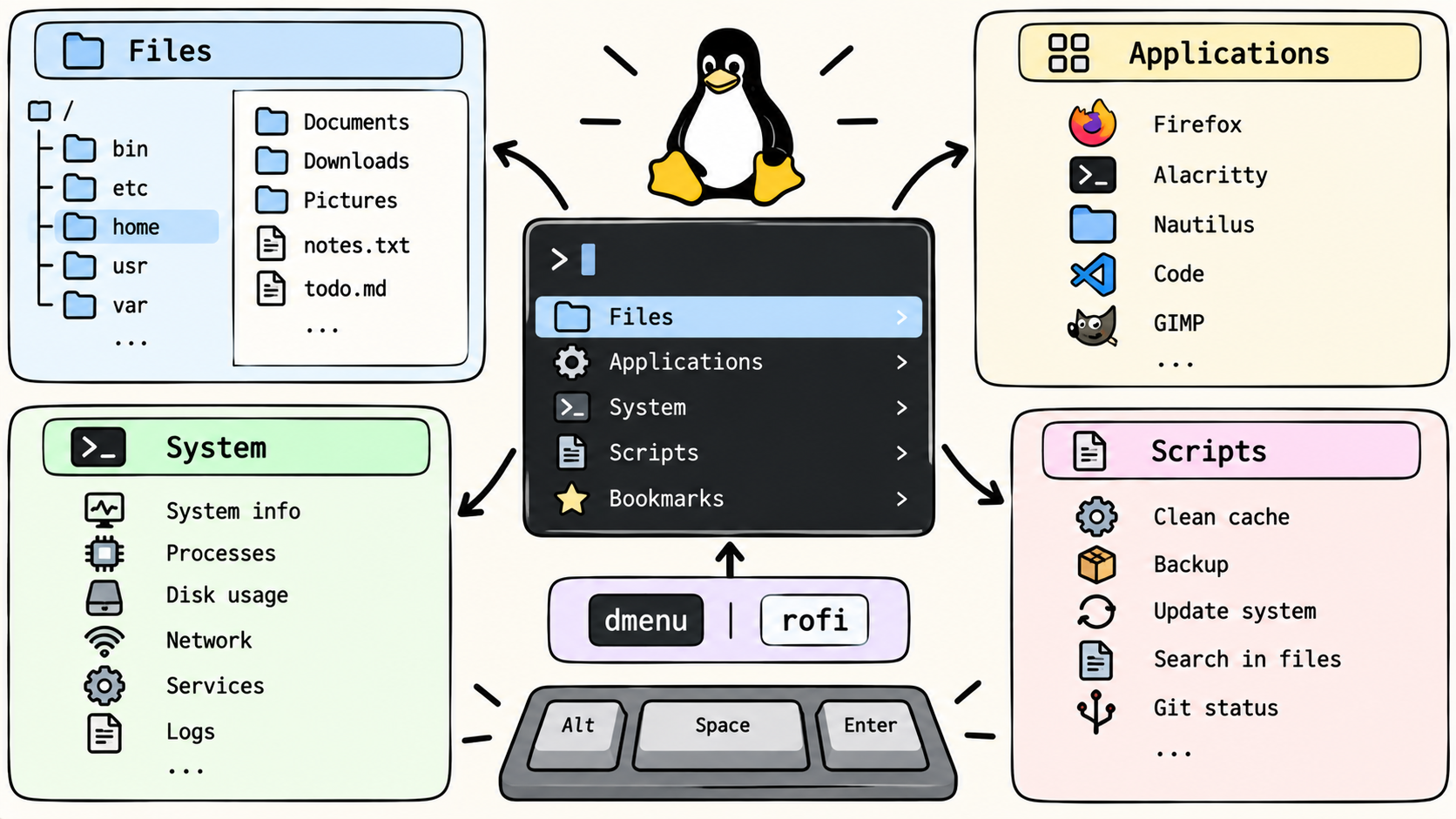
On Linux, productivity often comes from small but powerful tools. dmenu and rofi are great examples: minimalist application launchers that make your desktop more efficient.
But I wanted to go further. Instead of just launching programs, what if I could explore my system, run scripts, and interact with the shell — without opening a terminal?
That’s how I created dmenu_all, an extensible, open tool that transforms dmenu into a universal system navigator.
What It Does
- Browse your files: Navigate directories quickly through a dmenu-driven menu.
- Launch applications: Use it like a classic launcher.
- Run scripts: Define your own actions and execute them from the same interface.
- Chain commands: Build workflows without typing shell commands manually.
In short, dmenu_all makes dmenu (or rofi) a hub for your daily Linux tasks.
How It Works
At its core, dmenu_all is a set of scripts that dynamically feed options into dmenu or rofi.
- When you launch it, it presents you with a menu of available actions.
- Choosing an item either executes it directly (if it’s a command or script) or opens a submenu (for navigation).
- The design is modular and extensible: you can add your own scripts to extend functionality.
This means you can tailor dmenu_all to your workflow — whether you’re a developer, sysadmin, or power user.
Why It Matters
Most launchers stop at “open this app.” dmenu_all turns that idea into:
- A file explorer (fast, keyboard-driven).
- A command runner (without typing in a terminal).
- A scripting playground (drop in new scripts to extend it).
And because it’s built on simple tools ( bash, dmenu, rofi), it stays lightweight and hackable.
Extensibility
One of the main design goals was openness:
- You can add any script to the system and it will appear as a new menu item.
- Scripts can do anything: launch Docker containers, search logs, manage configs, or automate repetitive tasks.
- Because it’s just shell under the hood, your creativity is the only limit.
This makes dmenu_all less a static program and more a framework for productivity menus.
Conclusion
dmenu_all is about reclaiming speed and simplicity on Linux. By extending dmenu/ rofi into a universal system navigator, it makes interacting with your machine faster and more keyboard-centric.
👉 Check it out: GitHub Repo